
A clearer front-desk workflow can reduce administrative friction and protect chair time. Reception teams often switch between calls, bookings and follow-up, while cancellations create new tasks that need an owner and a response. Knowing how to streamline dental reception tasks starts with organising work around patient needs and schedule capacity, rather than adding another disconnected process.
This guide sets out a practical workflow for tracking routine tasks, improving handovers and responding to short-notice gaps. It covers how to protect patient-facing time, assign follow-up and manage a missed or cancelled appointment. TurnUp World supports this work as a dental capacity optimisation platform, with no-show prediction, automated patient outreach and waitlist management to help recover chair time. It works alongside your existing practice management system, with no PMS migration required.
Key Takeaways
- Map enquiries, booking changes, confirmations and follow-up as separate workflow stages, so ownership and handovers are clear.
- To understand how to streamline dental reception tasks, standardise repeatable steps while keeping exceptions and judgement-sensitive conversations visible to the right team member.
- Replace ad hoc cancellation callbacks with a tracked outreach and waitlist process, helping the team act on short-notice gaps and protect chair time.
- Start with one high-friction workflow, assign an owner and review task completion, handovers and chair capacity. TurnUp supports this alongside your existing PMS, without migration.
How to streamline dental reception tasks by mapping the daily workflow
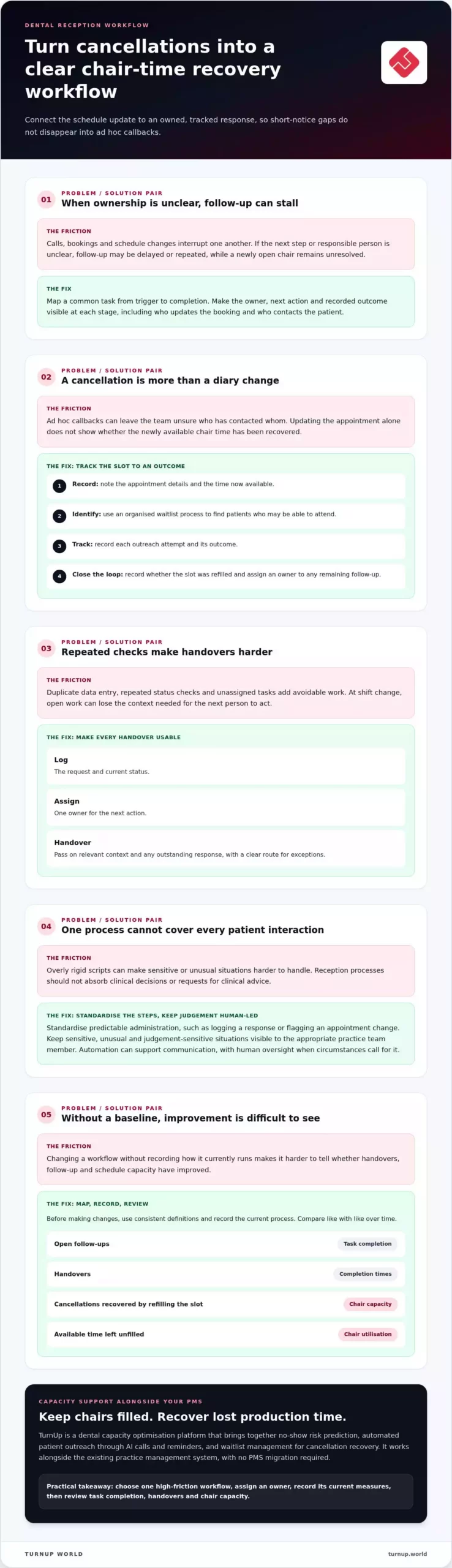
Calls, walk-ins and schedule changes can interrupt reception work before a task is complete. If the next step or owner is unclear, follow-up may be delayed or repeated. To understand how to streamline dental reception tasks, map what actually happens, from the first patient enquiry to the final update. This reveals where responsibility or information gets lost.
Which reception tasks create the most avoidable friction?
Separate patient-facing conversations from repeatable administration and follow-up. Look for duplicate data entry, repeated checks on an appointment’s status and tasks that sit unassigned between team members. These are workflow problems to address with clearer steps and ownership. Keep clinical decisions and requests for clinical advice with the appropriate clinical team member, rather than folding them into a reception process.
How can a dental team map a task from start to finish?
Choose a common task, such as a cancellation, and trace it from trigger to completion. Who receives the update? Who changes the booking? Who contacts the patient, and where is the outcome recorded? Map other stages separately, including enquiries, appointment changes, confirmations, records administration and follow-up. This reflects wider health administration principles: clear processes depend on knowing how information and responsibility move between roles.
- Frequency: How often does the task arise?
- Ownership: Who is responsible at each stage?
- Dependencies: What information or action must come first?
- Delays: Where does work pause, repeat or remain unresolved?
Use the map to set a baseline from observable measures, such as open follow-ups, handovers, completion times and schedule gaps filled. Record the current process before making changes, then compare results with that baseline. Consistent definitions make the comparison more useful than an external benchmark.
For related diary planning, see the Productive Dental Scheduling guide. TurnUp supports capacity visibility, patient outreach and cancellation recovery alongside the existing PMS, without a PMS migration.
Simplify dental reception processes without losing the human touch
Standardisation should make routine work easier, not make every patient interaction sound scripted. Agree consistent steps for confirmations, task updates and administrative handovers. Use shared task labels and record the next action, owner and relevant context. That way, a colleague can pick up the work without repeating checks or asking the patient to explain the same issue twice.
What should be standardised, and what should stay human-led?
Standardise predictable steps, such as logging a response or flagging an appointment change. Keep sensitive, unusual or judgement-sensitive situations visible to an appropriate practice team member. Automation should support patient communication and help staff focus their attention, not replace patient care or clinical judgement. The role of a healthcare administrator includes coordinating processes, but a clear process still needs human oversight when circumstances call for it.
How can reception teams make handovers more reliable?
Use a shared view that shows each task’s status, next action and responsible owner. For an unresolved enquiry, record what the patient needs, what has already been done and who will follow up. For an appointment change, state the next step, such as awaiting a patient response or contacting someone on the waitlist. Set a clear route for escalating exceptions, so open work does not disappear at shift change.
- Log: the request and current status.
- Assign: one owner for the next action.
- Handover: pass on context and any outstanding response.
For conversation-specific guidance, see Dental Reception Phone Scripts for Rebooking. TurnUp supports consistent outreach and capacity visibility as part of a dental capacity optimisation workflow. It works alongside your existing PMS, without migration. See how TurnUp supports dental capacity optimisation.
Recover chair time by connecting reception tasks to appointment capacity
A cancellation or missed appointment creates two linked tasks: update the schedule and decide what to do with the newly available chair time. Ad hoc callbacks can leave staff unsure who has contacted whom while the gap remains open. A tracked workflow makes the status, next action and owner visible, so the team can respond consistently without having to reconstruct progress.
What happens when a patient cancels at short notice?
Record the appointment details and the time now available, then use an organised waitlist process to identify patients who may be able to attend. Track each outreach attempt and its outcome. Record whether the slot was refilled, and assign an owner to any remaining follow-up. This connects schedule changes to capacity recovery, rather than stopping at a diary update.
No-show prevention can support the same workflow. Predicted no-show risk can prompt timely patient outreach, while waitlist management gives the team a way to respond if a cancellation still occurs. TurnUp brings these capacity activities together through no-show prediction, automated outreach and cancellation recovery. It works alongside the existing PMS, with no migration required.
Which measures help teams see whether the workflow is improving?
Use consistent definitions and compare like with like over time. Review missed-appointment patterns, cancellations recovered by refilling the slot and chair utilisation. Note how much available time remained unfilled and whether follow-up was completed. These measures can show where a handover or outreach step needs attention, without relying on unsupported industry benchmarks.
- Cancellation recovery: Record whether each short-notice gap was refilled.
- No-show patterns: Monitor changes using the same reporting approach.
- Chair utilisation: Review how available capacity was used.
For a broader measurement framework, see Dental Capacity Management. To connect outreach, waitlist recovery and capacity visibility in one workflow, explore TurnUp’s dental capacity optimisation platform.
Put a streamlined dental reception workflow into practice
Improve one process before changing the whole front desk. Choose a high-friction task, such as handling appointment changes, and document its current steps, owner and common hold-ups. This gives the team a clear starting point and keeps the change manageable. A practical way to streamline dental reception tasks is to test a better process in real conditions, then refine it using staff feedback and observable results.
How can a practice introduce workflow changes without disrupting reception?
Pilot the updated process with the team responsible for it. Explain who owns each action, where staff record progress and how to escalate an exception. During the pilot, ask what is unclear, where patients need a more personal response and which handovers remain unresolved. Set a review point in advance. Compare task completion, repeated work and open handovers with the baseline, then adjust the process before extending it to other tasks or practices.
Where can capacity optimisation support the front desk?
Once responsibilities are clear, technology can help coordinate repeatable scheduling work. TurnUp is a dental capacity optimisation platform that connects predicted no-show risk with automated patient outreach through AI calls and reminders. Automated waitlist management helps teams respond to short-notice cancellations, while capacity insights and chair utilisation reporting make available time easier to monitor. For DSOs, dashboards provide visibility across practices.
TurnUp works alongside the existing practice management system, so practices can improve capacity workflows without a PMS migration. It supports front-desk scheduling operations, while staff retain responsibility for judgement and patient care.
- Choose: one process that creates avoidable friction.
- Assign: a clear owner and escalation route.
- Review: completion, handovers and chair-capacity measures.
- Refine: use staff feedback before wider adoption.
Build a front desk workflow that protects capacity
An efficient reception workflow starts with visibility: map how work moves, make ownership clear and standardise repeatable handovers. Keep patient conversations personal, while giving staff a consistent process for managing appointment changes and outstanding tasks. This is the practical foundation for streamlining dental reception tasks without losing sight of patient needs or available chair time.
Review task completion, handovers and capacity measures regularly. When no-show prevention, patient outreach and cancellation recovery work together, teams can respond to schedule changes with less guesswork. TurnUp supports this as a dental capacity optimisation platform, with scheduling capacity insights and chair utilisation reporting for dental groups. It works alongside your existing PMS and does not require a migration.
Explore TurnUp’s dental capacity optimisation platform to see how your practice can coordinate outreach, waitlist management and chair capacity. Start with one workflow, learn from the team and build from there.
Frequently Asked Questions
How can a dental practice streamline reception tasks?
Map each task from the first enquiry or schedule change through to completion, then make ownership and handovers clear. To understand how to streamline dental reception tasks, identify repeated checks, duplicate administration and follow-ups without an owner. Standardise routine steps, keep exceptions visible to the appropriate team member, and review task completion and chair capacity to see whether the workflow is improving.
Which dental reception tasks can be automated?
Automation can support repeatable scheduling tasks, including appointment confirmations, patient outreach and waitlist management for short-notice cancellations. No-show prediction can help teams identify appointments for timely outreach. Automation should reduce repetitive administration and make follow-up easier to track, while staff retain oversight of unusual situations and conversations that need a personal response. The aim is more consistent communication and better use of reception time.
How can reception teams handle appointment cancellations more efficiently?
Record the newly available appointment, assign an owner and make the next action visible. Use an organised waitlist process to identify patients who may be able to attend, then track outreach and whether the slot was refilled. If it remains open, note any outstanding follow-up. This gives the team a repeatable cancellation-recovery workflow instead of relying on untracked, ad hoc callbacks.
Can dental reception automation work with an existing PMS?
Yes. TurnUp works alongside the practice’s existing practice management system and does not require a PMS migration. It supports dental capacity optimisation by connecting no-show prediction and automated patient outreach with waitlist management and cancellation recovery. Practices can improve scheduling operations while retaining their current PMS.
How should a dental practice measure reception efficiency?
Choose observable measures that reflect both task flow and schedule capacity. Track whether follow-ups are completed, how often tasks pass between owners and where work remains unresolved. For capacity, review missed-appointment patterns, cancellations refilled from the waitlist and chair utilisation. Use consistent definitions and compare like-for-like periods, so the team can spot changes without relying on unsupported external benchmarks.