
What if the safest way to integrate a new practice is to improve operational visibility before standardising workflows? When integrating new practices into a dental group, leaders need to protect day-to-day care while clarifying who owns decisions, which processes should align and where local routines are working well.
That balance can be difficult. Teams may face pressure to adopt group-wide workflows before leaders understand how the practice operates. Limited visibility into chair capacity can also make it harder to spot gaps and recover lost time. Integration does not have to mean disrupting the systems already in use.
This guide sets out a phased plan: establish ownership, map current workflows, make scheduling capacity visible, then prioritise changes with the team. It also explains how TurnUp World supports chair-time management alongside the existing PMS, without requiring a migration. No-show prediction, AI calls and waitlist workflows help teams address attendance risk and recover cancellations.
Key Takeaways
- Agree shared operating priorities before changing workflows, and retain local practices that work.
- Make integrating new practices into a dental group a phased process, with clear owners and review points for each workstream.
- Track chair utilisation, no-show performance and cancellation recovery to turn capacity visibility into practical decisions.
- Connect no-show prediction, patient outreach and waitlist recovery to protect chair time alongside the existing PMS, without migrating it.
Integrating a New Practice into a Dental Group Starts with Operational Clarity
Integration works best when the group agrees what needs to align before changing how the practice runs. Bring operating priorities, workflows and performance visibility into a shared framework, without centralising every decision. A local booking routine that supports patients and keeps the day running smoothly may be worth retaining.
Operational integration aligns priorities, responsibilities and visibility across a group. It does not require replacing the practice management system. That distinction keeps the work focused. Systems such as dental practice management software support practice administration, but the integration plan should define how teams work together, rather than assume that a technology change will solve every operational issue. TurnUp works alongside the existing PMS, without requiring a migration.
Set the integration outcome before changing workflows
Choose a practical outcome first, such as clearer visibility of available chair capacity or more consistent handling of cancellations. Record what must continue uninterrupted, including patient bookings, front-desk responsibilities, clinician schedules and the communication routes teams rely on. This gives the project a clear boundary. If a proposed change risks day-to-day operations without advancing the agreed outcome, pause it for review.
Map group priorities against local practice realities
Build a simple operating map with input from the group operations lead, practice leader and central scheduling team. For each scheduling task, record who does it now, who needs to be involved, where decisions go and how issues are escalated. This can reveal gaps before rollout, such as a cancellation process that depends on one team member’s local knowledge.
Separate requirements into two categories: group-wide expectations, such as centralised scheduling for dental groups, and practice-specific workflows that can remain local. For each proposed change, name one accountable owner and agree who can approve exceptions. This makes integrating new practices into a dental group a managed operational decision, rather than a blanket reset imposed on the team.
Build the Integration in Phases, Not Through a Single Group-Wide Reset
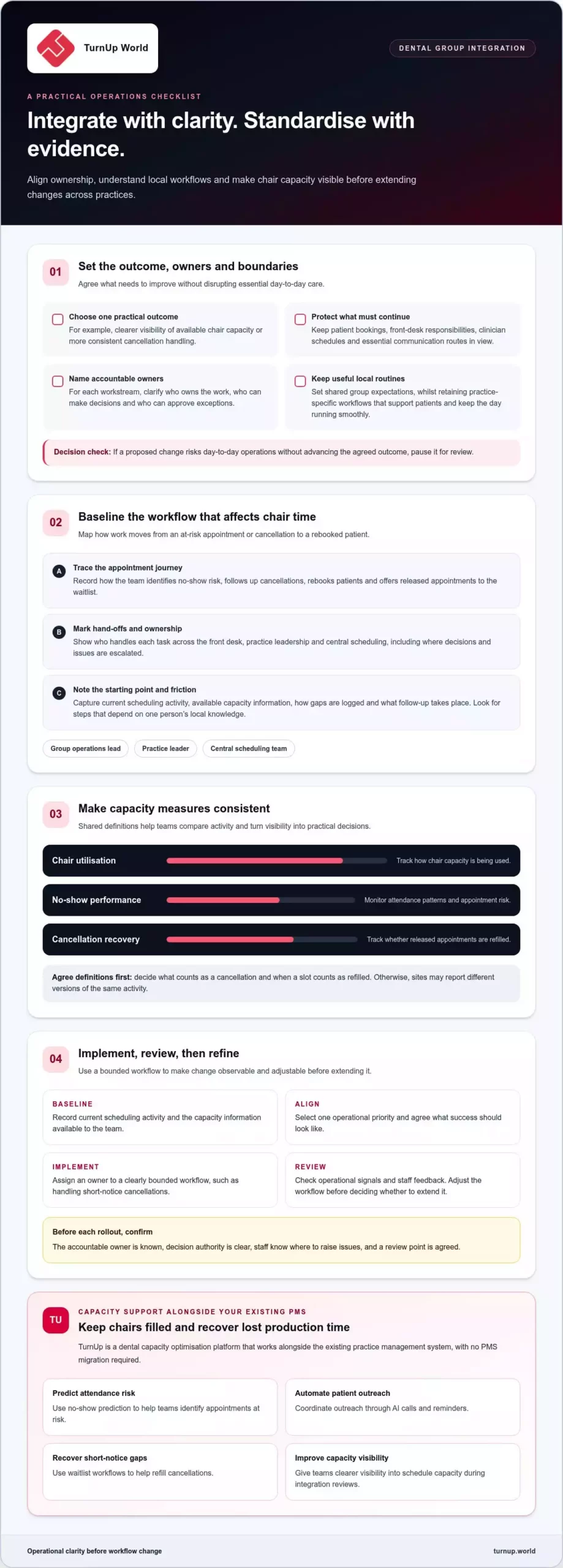
A single group-wide reset can change too much before teams understand the impact on daily work. A phased approach gives leaders room to test a bounded workflow, gather feedback and adjust before extending the change. When integrating new practices into a dental group, sequence decisions around evidence and readiness, rather than assuming every site must operate identically.
Use a simple sequence:
- Baseline: Record current scheduling activity and the capacity information available to the team.
- Align: Select one operational priority and agree what success should look like.
- Implement: Assign an owner to a clearly bounded workflow, such as handling short-notice cancellations.
- Review: Check operational signals and staff feedback before deciding whether to refine or extend the change.
For each workstream, name the accountable owner, the person or group authorised to make decisions, and a review point. Make sure everyone knows where to raise an issue before rollout begins. A phased approach makes change observable and adjustable, though it cannot remove every disruption or guarantee a particular result. A structured approach to change management in healthcare can also help leaders plan communication and team involvement.
Baseline the workflows that affect chair time
Map how the practice identifies appointments at risk of a no-show, follows up cancellations, rebooks patients and offers released appointments to people on the waitlist. Use available scheduling information to record how gaps are logged and what follow-up takes place. Note where responsibility changes hands and where a released slot can lose momentum. The aim is to understand the starting workflow, not to judge the team.
Sequence decisions around readiness and ownership
Group leaders can set shared priorities and reporting expectations, while practice teams can explain how those priorities fit local routines. Agree which decisions need group approval and which the practice can make locally. At each review point, ask the owner what is working, where staff encounter friction and whether the workflow should be adjusted before it expands. For teams focused on chair capacity, a dental capacity optimisation platform can support visibility into no-shows and cancellation recovery as part of that review.
Use a Practical Framework to Align Teams, Scheduling and Capacity Measures
A useful integration framework connects four elements: people, workflows, capacity visibility and review. Map who owns each scheduling task, how work moves between teams, what information staff need to act and how the group will assess whether the process is functioning. For example, trace a cancellation from the point it is recorded through patient outreach and any waitlist offer. This gives central teams a shared view without removing the practice team’s role in daily decisions.
Keep measures focused and define them consistently. Track chair utilisation, no-show performance and cancellation recovery. Agree what counts as a cancelled appointment and when a slot counts as refilled. Without shared definitions, a dashboard can show different versions of the same activity and make comparisons difficult.
Make scheduling responsibilities visible across sites
Map who handles appointment confirmation, cancellations, rebooking and waitlist outreach at each practice. Mark every hand-off between the front desk, practice manager and central scheduling team. A gap can arise when one team records a cancellation but nobody owns the next step. Assign responsibility for each action and specify what information must pass with it, so the team can act on short-notice capacity instead of leaving it unresolved.
Review signals without imposing unsupported targets
Use each practice’s own baseline as its reference point. Review later performance alongside operational context, such as workflow changes or differences in cancellation handling. Look for movement in chair utilisation, no-show performance and cancellation recovery, then ask the team what may explain it. Use the findings to refine processes rather than impose a universal target that ignores differences between practices. As part of the review, identify whether chair utilisation is being measured consistently across the group.
Make dashboards the starting point for a regular operational conversation: what changed, where is capacity being lost, and who will test the next adjustment? For a clearer view of chair utilisation and scheduling capacity across practices, explore TurnUp’s capacity optimisation platform. For decisions about appointment length and where to place new-patient appointments, see this guide to dental group capacity planning.
Protect Chair Time During Integration with Capacity Optimisation
Disconnected follow-up can leave a gap between identifying a likely no-show, contacting the patient and offering a released appointment to someone on the waitlist. Teams may know a chair is at risk or has become free, but lack a consistent process to act and see what happened next.
Capacity optimisation connects these steps. No-show prediction helps teams identify appointments that may need attention. Automated outreach, including AI calls and reminders, supports appointment confirmation, cancellation and rebooking. If a patient cancels, waitlist management helps the team recover the short-notice opening. Each function has a distinct role: prevention addresses attendance risk, while cancellation recovery focuses on using capacity that has already been released.
Connect prevention, cancellation recovery and visibility
For a group integrating a new practice, these workflows can support chair-time management without requiring every scheduling task to be centralised. TurnUp works alongside the practice’s existing PMS and does not require a PMS migration. DSO dashboards bring chair utilisation, no-show performance and cancellation recovery into view, helping leaders review how capacity is being managed across sites and where an operational follow-up may be needed.
Use that visibility to guide questions, not to jump to conclusions. If one practice has more unrecovered cancellations, review the local hand-offs, waitlist process and outreach workflow with the team before deciding what to change.
Choose an operational next step for the group
Start with one agreed workflow, such as responding to short-notice cancellations. Confirm who acts, how the waitlist is used and which operational signals the practice and group will review together. At the first review, look at what happened to released appointments and where the process created friction. Use those observations to refine the workflow before extending it.
To explore how TurnUp supports capacity visibility and chair-time recovery alongside existing systems, see TurnUp’s dental capacity optimisation platform and Front Desk Copilot.
Turn Integration into Ongoing Operational Progress
Integration should not end when the initial changes are in place. Treat it as an ongoing management practice: keep checking whether team workflows support the group’s priorities and the needs of each practice. Clear ownership and useful operational signals help leaders identify when a process needs attention as the group grows. For mid-size groups managing wider organisational growth and scaling, strategic advisors such as Carter Strategies offer business strategy consulting to help leadership navigate multi-site expansion.
Choose one next step for your team. Identify a scheduling workflow that would benefit from greater visibility, agree who will review it and use what you learn to guide the next decision. This keeps integrating new practices into a dental group focused on practical progress, rather than change for its own sake.
Explore how TurnUp can support your group’s capacity optimisation work. Explore TurnUp’s dental capacity optimisation platform and take the next step towards more informed scheduling operations.
With a clear priority and a measured approach, your group can build integration around better decisions and stronger day-to-day operations.
Frequently Asked Questions
How do you integrate a new dental practice into a group?
Agree the operational outcomes first, then involve the people who carry out the work. For integrating new practices into a dental group, create a responsibility map covering group decisions, practice-level actions and escalation routes. Share it with the team before changing a workflow. For example, clarify who resolves a booking issue when the usual contact is unavailable, so staff know where to turn.
What should a dental group standardise when it adds a practice?
Standardise the information teams need to coordinate, not every local routine. Agree shared meanings for appointment statuses, who owns each patient follow-up and how teams record whether a cancelled slot was refilled. These basics make hand-offs easier to understand across sites. Retain effective local booking practices where they fit the group’s operating priorities, and review exceptions with the people who use those workflows.
Can a dental group integrate a practice without changing its PMS?
Yes. A group can retain the practice’s current PMS while aligning operational workflows around it. TurnUp works alongside the existing PMS and does not require a PMS migration. This allows the group to improve capacity optimisation without making a system replacement part of the integration plan. Define which scheduling activities the teams want to improve, then review how those workflows fit current practice operations.
How can a dental group measure whether practice integration is working?
Review operational measures alongside evidence that the agreed workflow is being followed. Track chair utilisation, no-show performance and cancellation recovery, then ask teams whether ownership and hand-offs are clear in practice. If a released appointment remains unfilled, trace where follow-up stopped before changing the process. Compare trends in context rather than treating a single measure as proof that integration is succeeding or failing.