A full diary can still leave chair time unused. Streamlining dental appointment scheduling means connecting reminders, scheduling rules, cancellation response and team coordination so staff can spot gaps and act before they disrupt the day. The goal is to protect usable chair capacity while keeping workloads manageable.
Missed appointments, late changes and uneven demand can put pressure on front-desk teams and leave rooms underused. Treating these as connected operational issues, rather than isolated diary problems, helps practices find and address the causes.
Practical improvements include consistent appointment templates, timely reminders and coordination across multiple locations. Track whether changes are working, and consider how no-show risk prediction, automated patient outreach and waitlist management can help teams respond to cancellations. Use these steps to identify bottlenecks and protect chair time without adding avoidable admin.
Key Takeaways
- Build reminders into a clear confirmation and cancellation workflow so teams can act on changes before chair time is lost.
- Use consistent appointment templates and visibility of available slots to reduce clashes and make gaps easier to address.
- Review schedule capacity and patient waiting patterns with the team to spot where daily coordination can improve.
- For multi-site operations, TurnUp helps predict no-show risk and recover short-notice cancellations, working alongside the existing PMS without requiring migration.
1. Automated appointment reminders
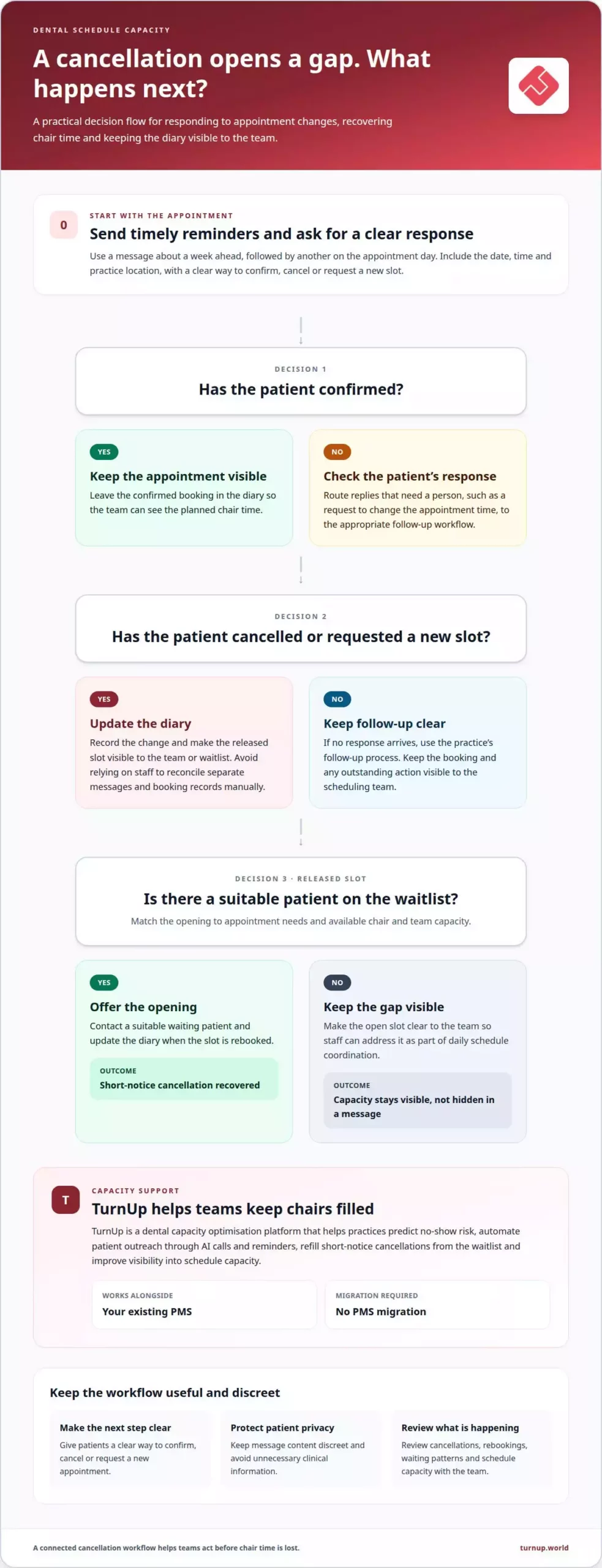
An automated reminder workflow should confirm bookings and make changes easy to action. Send a message about a week ahead, followed by another on the appointment day. Text messages suit short prompts; email can include fuller booking details. State the appointment date, time and practice location, and provide a clear way to cancel or request a new slot. Patients then have a practical next step instead of needing to phone with questions.
To support UK GDPR compliance, explain what appointment and recall messages patients can expect. Record their channel preferences, limit access to contact details and keep message content discreet. For example, confirm a dental appointment without including unnecessary clinical information. Keep appointment administration separate from promotional content, and make it straightforward for patients to update their contact details or communication preferences.
Make confirmation part of the process, not just a reminder. Ask patients to confirm or indicate that they need to reschedule, then route each response into the appropriate workflow. Keep confirmed appointments visible in the diary; treat cancellations as gaps staff can address. Set a clear process for replies requiring human follow-up, such as a request to change the appointment time.
Connect reminders with online booking where available. If a patient cannot attend, offer a direct way to view suitable availability or request a new appointment. Update the diary accordingly, rather than relying on staff to transfer details between messages and booking records. Test the full journey with an example booking, from the initial reminder through to a rescheduled slot.
Give recall communications their own trigger. When a patient is due to book their next visit, send a concise message with a booking route, then record whether they booked or need follow-up. Regularly review delivery failures, replies and rescheduling activity. These checks can reveal outdated contact details and help refine reminder timing, making automated reminders part of a wider scheduling workflow.
2. Scheduling bottlenecks, double-bookings and empty appointment slots
A busy calendar can still contain gaps, overlaps and poorly matched appointments. Review where bookings stall, such as unanswered calls, restricted online availability or treatment slots that do not match appointment needs. A patient booking a filling, for example, needs a slot planned for that procedure, not simply the next opening. Reviewing these patterns makes capacity more visible and helps protect chair time and revenue.
Online booking gives patients access to available appointments outside practice opening hours. Add a booking link to the practice’s local search profile and website, then display the appointment types patients can book directly. Keep the calendar synchronised with staff availability so a booked slot disappears from other booking routes. Review feedback about difficult booking steps and use recurring issues to improve the process.
Which dental practice management software offers online booking, reminders and waitlist management? Look for a dental practice system that supports these functions together and has a live calendar that updates as bookings change. Check that a cancellation releases the slot and makes it visible to the team or waitlist, rather than leaving staff to reconcile separate records manually.
NHS and private booking routes vary according to the service and how appointments are arranged. According to NHS, direct appointment booking should be available for in-hours and urgent-care services, including dental services where commissioned. Private practices generally manage their own booking routes and availability, so patients may book directly with the practice.
How should practices allocate appointment slots for treatments and emergencies? Use block scheduling to reserve suitable periods for procedure types, such as restorative work, new-patient examinations and urgent appointments. General practices that provide a full spectrum of oral healthcare, such as Blue Ridge Family Dentistry, often structure daily diaries around routine exams and diagnostic work so predictable visits run smoothly alongside specialised procedures. Set the blocks according to available team and chair capacity, then review unused blocks and recurring delays. This balances planned care with room to respond to urgent demand.
For a practical improvement cycle, record booking delays, double-booking incidents, cancellations and patient feedback. Review the patterns with the scheduling team, then adjust online availability or diary blocks. A capacity-focused scheduling approach can help teams connect open slots with cancellation recovery.
3. How to make a dental office more efficient?
A practical approach to streamlining dental appointment scheduling starts by measuring where staff time and chair capacity are lost. Standardise appointment templates by treatment type, then compare planned appointment lengths with actual chair time. A daily team huddle can confirm responsibilities for schedule changes, patient updates and clinical hand-offs before appointments begin. Managers can then spot recurring delays and refine one workflow at a time.
Make appointment arrangements responsive to patient needs. Record preferences, such as allowing extra time for someone experiencing dental anxiety or choosing an accessible appointment time for a patient with mobility needs. Where patients require language assistance, partnering with professional interpreting and translation services such as Dialog One ensures appointment details and clinical questions are clearly understood. Share relevant scheduling notes with the appropriate team members so they can prepare. Clear communication can make the visit easier to manage without unnecessary calls or repeated questions.
To reduce missed appointments and late cancellations, combine confirmations with a simple cancellation route and a process for offering released slots to suitable patients. Review no-show rates by appointment type, time of day and location. For patients with a history of missed visits, consider booking closer to the appointment date. This can limit how long an open slot remains in the diary.
Scheduling software can connect attendance, waiting times, cancellations, rebookings and treatment follow-up. If a patient accepts a treatment plan but leaves without booking the next visit, assign a follow-up action and record its outcome. If patients repeatedly wait beyond their appointment time, review start delays and appointment overruns. These measures help managers identify whether the main constraint is diary design, communication or staff workload, then target the relevant process.
4. Scheduling across multiple practice locations
For a dental group, separate diaries can hide available chair time across the network. A central view helps operations teams see appointments, dentist availability and open slots across practices. Multi-location booking software can manage practice bookings through a single interface. Keep each site’s calendar clearly identified so staff can offer a suitable appointment without confusing locations or clinicians.
Set shared scheduling rules while allowing for local differences. For example, a group can use consistent appointment types while each practice defines its own available hours and treatment capacity. This gives central teams a clear framework without assuming every site has the same chairs, clinicians or demand. Review the rules when staffing or opening hours change, and update availability across the relevant calendars.
Patients need a seamless booking experience, and convenience depends on accurate location details. Include the practice address, appointment time and dentist in booking confirmations. If a patient asks for an earlier slot, central staff can search across locations and offer alternatives. Make the location clear before confirming so the patient can choose a site that works for them.
Use a shared workflow for cancellations and waitlists. When a slot opens at one practice, record its location, treatment type and timing before contacting suitable patients. A central team can then match the opening to someone able to attend that site. Track how quickly each location fills released appointments, alongside unfilled slots and booking changes. These measures show where local operations need attention.
Keep everyone aligned with a regular review of site calendars and capacity reports. Compare appointment demand, chair availability and cancellations by location, then adjust allocation rules where patterns differ. This turns multi-site management from separate diary maintenance into a coordinated process. To strengthen visibility across practices, review multi-site capacity management as part of your scheduling workflow.
TurnUp World: No-show/FTA prediction and automated prevention for dental appointments
TurnUp World helps dental practices and multi-site DSOs protect chair time when missed appointments and late cancellations disrupt schedules. Its capacity optimisation platform predicts no-show risk and supports automated prevention through patient outreach, including AI calls and reminders.
When a patient cancels, the AI call centre can support appointment cancellation and rebooking, while automated waitlist management helps teams recover short-notice openings. Scheduling capacity insights give operations teams greater visibility into chair use and gaps across practice locations. TurnUp works alongside your existing PMS, so a PMS migration isn’t required.
This approach suits practices looking to connect no-show prevention, cancellation recovery and capacity visibility rather than relying on reminders alone. To discuss how TurnUp World can support your scheduling operations, contact TurnUp World.
Make scheduling a continuous improvement priority
Make scheduling performance a standing operational measure, not a one-off software project. Choose the friction point with the clearest effect on chair availability or team workload, assign an owner and agree what a better outcome looks like before changing the workflow. This creates a clear basis for deciding whether to keep, adjust or stop the change.
Use streamlining dental appointment scheduling as an ongoing improvement cycle: set a baseline, make one focused change, then review diary patterns and staff feedback. If performance improves in one location but not another, investigate local workflow differences before applying the same change everywhere. Include operational indicators and feedback from the people using the process. If a change reduces staff steps but makes appointment access harder, refine it before making it standard.
If your team is ready to connect schedule capacity with prevention and operational visibility, Contact TurnUp World to discuss scheduling. Bring the workflow problem you want to solve and the outcome you want to improve. A focused next step can help your team build a more effective scheduling operation.
Frequently Asked Questions
How to make a dental office more efficient?
Reduce avoidable hand-offs by assigning clear ownership for each scheduling task. Specify who handles booking changes, updates clinical teams and follows up when a patient has not confirmed. Review recurring exceptions with staff and remove steps that cause duplicate data entry. This gives managers a practical way to improve daily operations without changing every workflow at once.
Why is optimal diary management important?
Effective diary management aligns appointment demand with the right clinician and available capacity. A mismatch, such as booking a treatment into a slot that is too short, can affect later appointments and staff workloads. Comparing planned and actual appointment times helps managers identify where diary rules need adjustment. It also supports better-informed capacity decisions than relying on a fully booked calendar alone.
What appointment scheduling workflows help reduce patient waiting times?
Use a consistent arrival-to-chair workflow. Record patient arrival promptly, notify the clinical team and flag appointments running behind so front-desk staff can communicate delays. Review the causes afterwards, such as late starts or longer-than-planned appointments, and adjust the relevant process. Clear hand-offs between reception and clinicians help prevent avoidable waiting from building across the day.
How can dental practices improve phone booking and online booking accessibility?
Offer patients a clear choice of booking routes and keep information consistent across them. A team member taking a phone booking can enter it directly into the practice calendar, while online users need straightforward appointment options and location details. Make it easy for patients who need assistance to request support. Review enquiries that do not become appointments to identify confusing steps.
What metrics should a dental practice track to measure scheduling efficiency?
Track chair utilisation, attended appointments, missed appointments, cancellations, rescheduled bookings and the time patients wait after arrival. Define each measure consistently, then review trends by clinician, appointment type and practice location. A rise in cancellations for one appointment category, for example, may point to a specific workflow issue. Pair operational data with staff feedback to understand causes, not just outcomes.
Which dental practice management software offers online booking, reminders and waitlist management?
Choose a dental practice system that combines online booking, automated reminders and waitlist management with a live calendar that updates as bookings change. Check that cancellations release slots for the team or waitlist.