A reminder can prompt a response, but it cannot refill a chair after a cancellation. Effective dental no-show reduction software links clear, well-timed reminders with simple ways to confirm, cancel or reschedule. It can also help teams identify appointments at risk and act on newly available chair time.
Missed appointments disrupt the schedule and leave less time for patient care. Clear communication helps, especially when messages use patients’ preferred contact channels and make the next step obvious. But reminders work best as part of a broader scheduling workflow, not as a standalone fix.
This guide explains how dental software can support attendance, from patient communication preferences to appointment management and waitlist workflows. You’ll learn what to look for, how these features work together, and how a capacity optimisation platform can help practices and multi-site dental groups protect chair time while working alongside their existing practice management system.
Key Takeaways
- Make it easy for patients to confirm, cancel or reschedule so teams can respond before a chair sits empty.
- Match reminder channels to patient communication preferences, and make each message’s next step clear.
- Combine reminders with timely follow-up and schedule workflows that help recover short-notice cancellations.
- Assess software by how its features work with your existing PMS and support visibility across appointments and chair capacity.
1. How Does Dental Software Help Reduce No-Shows?
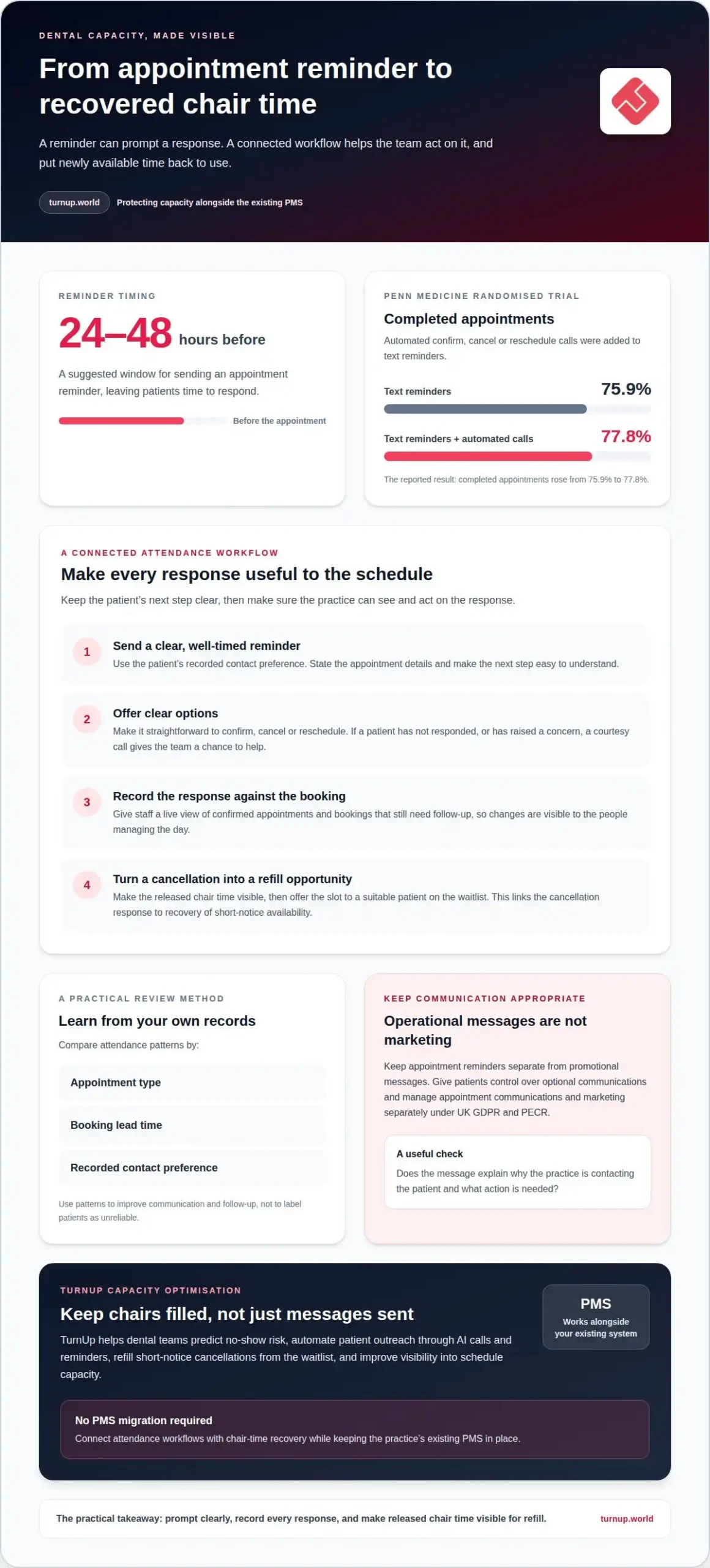
For medical appointments, forgetting can be one reason patients do not attend. Work conflicts and difficulty reaching the practice to reschedule are also among the most common reasons. Dental teams can address these barriers by sending clear appointment details and making confirmation, cancellation and rescheduling straightforward. For example, a patient who cannot attend can cancel promptly, giving the practice time to offer the slot to someone else. Late cancellations and unconfirmed bookings leave less time to plan the day. A useful workflow records each response against the appointment, so staff can distinguish confirmed attendance from bookings that still need follow-up.
A missed appointment affects more than one patient’s slot. It can leave a clinician, surgery and allocated staff time unused, while reception handles last-minute changes. Scheduling software can show upcoming appointments and changes in a live view, helping staff spot gaps and avoid double bookings. When an appointment becomes available, the team can offer it to a suitable patient on the waitlist. This links confirmation to chair-time recovery: the cancellation is recorded, the opening becomes visible, and outreach can begin without staff having to notice the gap later.
Dental practices can automate confirmations with reminders that offer clear options to confirm, cancel or reschedule. When a patient cancels, the system can flag the released slot and offer it to suitable patients on the waitlist. This connects appointment communication with vacancy recovery instead of treating a reminder as the final step.
Live appointment management can also help teams coordinate booked patients and walk-ins. Recording walk-ins in the same live queue lets staff see who is waiting and who is next. The display should distinguish a provider’s running delay from an estimate of a patient’s remaining wait, because these measure different things. For example, a clinician running late does not tell a waiting patient how long it will be before their appointment begins. A reliable schedule view gives reception a consistent basis for updating patients, managing changes and directing attention to the next available chair.
Patient notifications and communication preferences
Patients may respond differently to appointment messages, but a dental practice should not assume that age predicts attendance. Use the practice’s own records to compare attendance patterns by appointment type, booking lead time and recorded contact preference. For example, patients who choose email may need a different reminder route from those who prefer phone calls. Focus comparisons on improving communication and scheduling, not labelling patients as unreliable. Reviewing these patterns gives operations teams a practical basis for adjusting message timing and follow-up.
Make each notification easy to understand and act on. Identify the practice, state the appointment details, explain what has changed and give the patient a clear next step. A cancellation message should say whether the patient needs to rebook; a reminder should make confirmation straightforward. After a missed appointment, follow up neutrally and offer a way to reschedule. This keeps communication useful and gives the team a consistent record of patient responses.
Keep appointment reminders separate from marketing messages and give patients control over optional communications. This distinction matters when applying UK GDPR and PECR: handle appointment communications as operational messages and manage promotional communications separately. For example, a reminder about an upcoming examination should not also promote an unrelated service. Clear separation helps patients understand why the practice is contacting them and what action is needed.
Questions or concerns can also stop a patient from confirming. They may need to ask about paperwork, directions or appointment details before committing. Provide a clear way to raise questions, then record the concern and its resolution in the patient communication workflow. If a patient cannot attend at the booked time, clear cancellation and rescheduling options can make the next step straightforward. Reviewing unanswered messages alongside attendance patterns helps teams identify communication problems rather than treating every missed appointment as the same issue.
3. How Does an Appointment Reminder Work?
An appointment reminder turns a booking into a clear prompt to act. Automated SMS, WhatsApp, email or phone messages can share the appointment details and ask the patient to confirm. A reminder sent 24 to 48 hours before the appointment gives patients time to respond. The scheduling team can then see which bookings are confirmed and where manual follow-up may help. The exact channel should reflect the patient’s recorded preference and the contact details held by the practice.
Automated reminders handle routine contact consistently, while courtesy calls give staff a chance to answer questions or clarify details. A call can help when a patient has not responded, has raised a concern or needs help understanding the appointment arrangements. The team can record the outcome and route any cancellation or rescheduling response into the booking workflow. This combines the efficiency of automated contact with human attention when a message alone has not resolved the issue.
Evidence supports combining channels rather than relying on text alone. In the Penn Medicine randomised trial, completed appointments rose from 75.9% to 77.8% after automated confirm, cancel or reschedule calls were added to text reminders. The workflow matters: a patient who cannot attend needs a clear way to respond, and the practice needs that response reflected in its schedule.
Automated reminders also carry operational and privacy risks. An incorrect or outdated number can leave a patient uninformed, while unnecessary appointment details could expose private information on a shared device. Keep messages accurate, concise and limited to what the patient needs to act. Separate appointment updates from promotional content, and let patients control optional communications. Review undelivered messages and unanswered confirmations, then assign a manual follow-up route. For example, staff can call when a reminder fails rather than assuming silence means confirmation. This gives the practice a defined response when automation cannot complete the task.
4. How do UK dental reminder software options compare on features and integrations?
Compare systems by the scheduling problem they solve, not by the number of features. Practice management software may combine appointment scheduling, patient records, billing, reports and reminders. A reminder function sends a prompt; a wider capacity workflow can also help teams identify at-risk appointments and respond to cancellations. Assess whether the system supports confirmation, cancellation and rebooking, as well as visibility into available chair time.
Integration should reduce duplicate work. Map how an appointment moves from booking to confirmation, cancellation or rescheduling, then assess what staff need to update in each system. A platform that works alongside the existing practice management system avoids a PMS migration. Check how teams view appointment status and capacity, and whether front-desk staff can act without switching between disconnected workflows.
For a single practice, prioritise clear appointment statuses, patient communication options and useful reporting. A multi-site dental group may also need a shared view of chair utilisation, no-show performance and cancellation recovery across its locations. In either setting, reporting is useful when teams apply consistent definitions. For instance, separate cancellations made in advance from missed appointments so managers can see where follow-up or schedule changes may help.
Review access controls as part of the decision. Separate accounts for owners, branch users, assistants and customers help distinguish who uses the system. Then assess the daily workflow with a real example: a patient cancels, the opening appears, and staff can see the next operational step. Include the people who manage appointments in this assessment, since a feature only helps when it fits their work. Compare how each option supports that sequence, rather than relying on a feature list alone.
Use this decision test: does the software connect patient outreach with schedule visibility and a clear response to cancellations? Explore chair-time optimisation when your practice needs to connect those operational steps.
TurnUp World
TurnUp World helps dental practices and multi-site DSOs protect chair time with a capacity optimisation platform. It combines no-show risk prediction and automated patient outreach with cancellation recovery, helping teams act before appointments become unused capacity.
Teams can use automated reminders and AI-driven confirmation calls to manage appointment responses, then fill short-notice openings through waitlist workflows. Scheduling capacity insights help operations leaders see where chair time is being lost and where recovery processes need attention. TurnUp World works alongside an existing practice management system, so a PMS migration is not required.
If missed appointments are disrupting your schedule, contact TurnUp World to discuss your practice’s capacity workflow.
Make chair-time recovery part of the operating plan
Choosing dental no-show reduction software means finding a solution that supports a repeatable operating rhythm, not just one that sends more messages. Give teams a shared view of appointment responses, cancellations and recovered slots. Use that view to identify where action slows down, whether follow-up starts too late or available capacity remains hidden. This makes attendance management an operational process teams can refine across practices, rather than a series of isolated front-desk tasks.
As a next step, consider how your current workflow connects patient outreach with chair utilisation. TurnUp World brings no-show risk prediction and automated prevention into a broader capacity optimisation approach for dental practices and multi-site DSOs. The platform works alongside your existing practice management system, without requiring a PMS migration.
Contact TurnUp World to discuss how your team can make appointment capacity more visible and actionable. A clearer workflow gives your practice a stronger foundation for protecting chair time.
Frequently Asked Questions
How Does Dental Software Help Reduce No-Shows?
It helps teams turn appointment activity into clear follow-up priorities. For example, staff can distinguish a patient who has explicitly cancelled from one who has not responded, then act accordingly. Reviewing attendance by appointment type or booking lead time can also reveal where scheduling workflows need attention. Dental no-show reduction software makes these patterns easier to monitor and address consistently.
How does a dental no-show reduction software provider help fill cancelled slots?
A structured waitlist workflow connects cancellation handling with slot recovery. When a patient cancels, the practice needs to identify suitable patients, send an offer, record the response and update the appointment status. For instance, a patient who accepts an opening should be removed from the waitlist for that slot, while other patients remain available for future cancellations.
How can a dental no-show reduction software provider help a practice reduce missed appointments?
A provider can help prioritise follow-up using appointment-level risk signals. TurnUp World’s prediction model uses more than 30 signals, including attendance history, treatment type, appointment time and previous reminder responses. The system can then trigger follow-up suited to the appointment, such as a reminder or an AI call. This helps teams focus attention where an unanswered booking needs action.
How can a dental operations specialist assess what no-shows cost a practice?
Start by counting unattended appointments over a consistent reporting period, then separate late cancellations from patients who did not attend. Multiply each missed slot’s duration by the practice’s expected clinical capacity for that time. Review the result alongside whether the chair was refilled and how much staff time was spent responding. This distinguishes unused capacity from activity the practice recovered.
How Does an Appointment Reminder Work?
A reminder uses the appointment record to prompt a patient before their visit. It typically states the date, time and practice details, then provides a way to respond. If the appointment changes, the message should reflect the latest booking information. For example, a patient whose appointment time has changed needs an updated reminder, not the original details, to avoid confusion at reception.
How Effective Are Confirmation and Reminder Systems?
They can improve attendance, but practices should measure local results rather than rely on a headline claim. A Cochrane review of seven trials found text reminders were associated with an attendance risk ratio of 1.14 compared with no reminder. Track confirmed attendance, cancellations and missed appointments using consistent definitions. Reviewing those outcomes helps managers see which communication workflows support their own patient population.