
A cancellation call shouldn’t end with an empty chair and no clear next step. Consistent dental reception phone scripts help your team respond with empathy, offer practical appointment options and make rebooking feel helpful rather than pushy.
When receptionists handle cancellations differently, patients can receive mixed messages and short-notice gaps can be harder to fill. Give staff wording they can adapt, along with a repeatable process for offering suitable times and contacting patients on the waitlist.
This guide provides ready-to-use templates for cancellations, rebooking requests and short-notice openings, plus a practical follow-up workflow. It also explains how automation can support timely outreach while staff apply patient-facing judgement. TurnUp World helps practices recover chair time through AI calls, waitlist management and capacity insights. It works alongside your existing PMS, with no migration required.
Key Takeaways
- Use dental reception phone scripts as adaptable prompts, so cancellation and rebooking conversations stay clear and patient-centred.
- Adjust the templates for incoming cancellations, patient-requested changes and outgoing calls. Check suitable appointment options before offering them.
- Make each cancellation the start of a visible recovery workflow: record the outcome, agree the next action and contact suitable waitlisted patients.
- Combine staff judgement with TurnUp’s AI calls, waitlist management and capacity insights to support chair-time recovery alongside your existing PMS.
Why dental reception phone scripts matter when appointments change
A rebooking call needs a clear purpose, not a rigid performance. A useful dental rebooking script helps reception staff listen, offer relevant choices and agree a clear next step. Shared prompts give the team a consistent structure, even when different people handle the call.
That structure supports schedule continuity too. A cancellation can become an opportunity to rebook the patient or find someone who can use the opening. Don’t assume why the patient cancelled or make them feel blamed. Ask, listen and offer options without pressure.
Build every rebooking conversation around the patient
Start warmly, confirm what the caller wants and give them space to explain. For example: “Of course, I can help with that. Are you looking to rearrange your appointment?” Keep questions neutral. The patient may share a reason, but staff shouldn’t demand one or guess at their circumstances. Once you understand the request, offer suitable alternatives and let the patient decide. If none work, agree what should happen next rather than pushing for a commitment.
Use a consistent call structure without sounding scripted
Use four steps: acknowledge the request, clarify what the patient needs, offer relevant options, then confirm the outcome. Personalise the wording, pace and follow-up questions while keeping the sequence consistent. A natural conversation matters more than reciting a prepared line. For practices using appointment scheduling software, technology can support coordination, but clear patient-facing communication still shapes the experience. For more on connecting call handling with front-desk processes, see how to streamline dental reception tasks.
Dental reception phone scripts for cancellations and rebooking
Use these dental reception phone scripts as adaptable prompts. Replace the brackets with appointment details and options shown in your booking system. Before making an offer, confirm that the time is available and suitable for the appointment. Record changes and explain next steps using your practice’s established process.
Handle cancellations and patient-requested changes
Incoming cancellation: “Thanks for letting us know, [patient name]. I can cancel your appointment on [date] at [time]. Would you like to rearrange it now, or would you prefer to contact us later?”
Patient-requested change: “Of course. You’re looking to move your appointment on [current date]. I can offer [available date and time] or [alternative date and time]. Would either suit you?”
If the patient chooses an option, confirm it clearly: “That’s now booked for [agreed date] at [agreed time]. [Explain the relevant next step using your practice’s usual process].” If neither option works, ask what would be more suitable and agree how the conversation will continue. Before ending the call, repeat the agreed action so both sides know what happens next.
Offer an earlier appointment without pressure
Short-notice offer: “Hello, [patient name]. We have an earlier appointment available on [date] at [time]. Would you like to hear more about it? There’s no problem if that doesn’t suit you.”
Give the patient time to decide. If they accept, confirm the new appointment and explain what happens to their existing booking under your practice’s process. If they decline, respond: “Of course, thanks for letting me know. Would you like us to contact you if another suitable appointment becomes available?” Record their preference and the agreed next action.
Keep each template concise, but personalise the greeting and respond to what the patient says. A clear close prevents uncertainty: repeat the agreed date and time, then state who will do what next. To coordinate rebooking outreach with chair capacity, explore TurnUp’s dental capacity optimisation platform.
Turn cancellation scripts into a reliable rebooking workflow
A well-handled call is only the first step. Without visible follow-up, a cancellation can leave chair time unused or lead to duplicate outreach. Prompt, organised follow-up turns a cancellation into a clear opportunity to recover chair time.
Follow a repeatable cancellation-recovery sequence
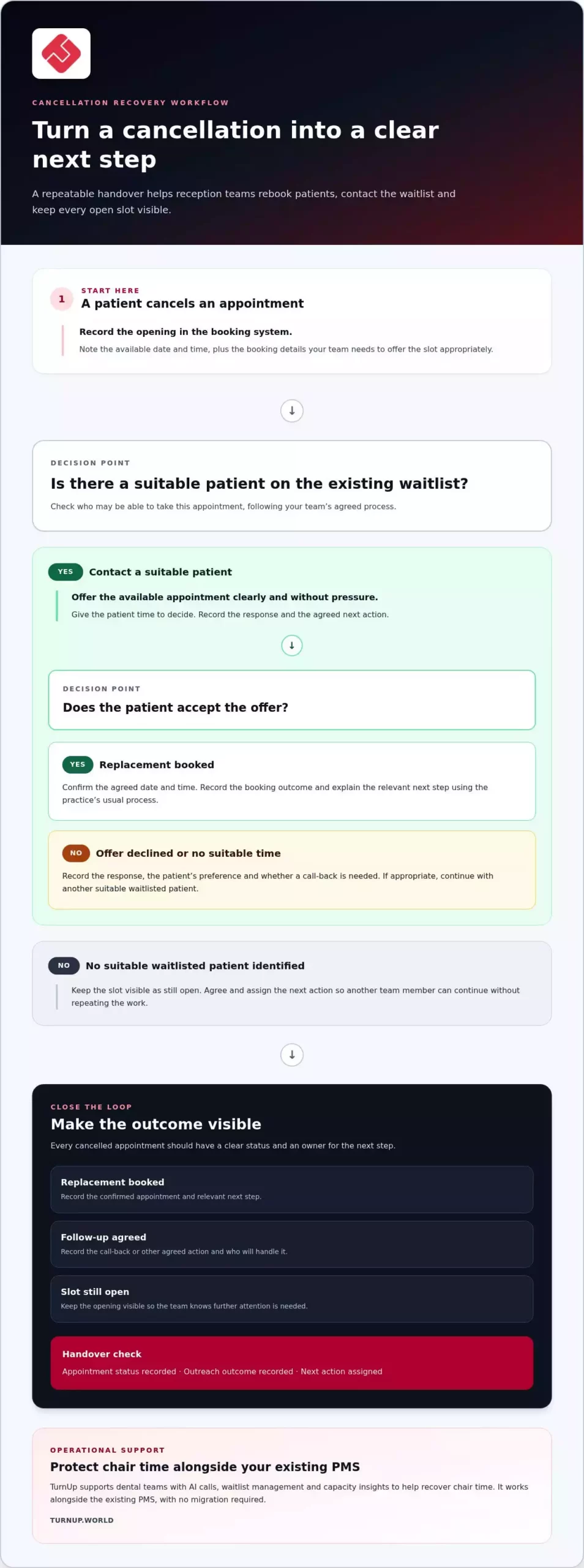
Use the same handover from the moment a patient cancels to the final booking outcome:
- Record the opening: Update the appointment and note the available date and time, along with any booking details your team needs to offer the slot appropriately.
- Identify suitable patients: Review the practice’s existing waitlist and contact patients who may be able to take that appointment, following your team’s agreed process.
- Make the outcome visible: Record whether an offer was accepted or declined, whether a call-back is needed, or whether the slot remains unfilled. Assign the next action so another team member can continue without repeating the work.
This gives every gap a useful status: replacement booked, follow-up agreed or still open. Reception staff can see where attention is needed instead of relying on memory or separate notes. As a quick handover check, confirm that the appointment status, outreach outcome and next action are all recorded.
Keep scripts aligned across reception teams
Agree shared wording for appointment offers, declines, call-backs and confirmations, while allowing staff to adapt their tone to the patient. Practise realistic scenarios, such as a patient who can’t accept the first option, and refresh templates when the booking process changes. Review completed, declined and unfilled offers together. These outcomes can help the team spot friction, such as unclear options or follow-up without a named owner. For a broader view of chair capacity, read the productive dental scheduling capacity optimisation guide.
Dental reception phone scripts work best when each conversation feeds a shared recovery process. TurnUp combines AI calls, waitlist management and capacity insights to support that process alongside your existing PMS, without requiring a migration. Explore TurnUp’s cancellation-recovery platform.
Support dental rebooking calls with capacity visibility and automation
Manual follow-up can leave a cancellation dependent on who noticed the gap, who has time to call and whether the latest booking information is easy to find. A coordinated workflow gives the team clearer visibility of open capacity and suitable waitlisted patients, so outreach has a defined next step. Scripts still matter, but staff can act more consistently when they can see what needs attention.
Keep patient conversations human as operations become more automated
TurnUp combines no-show risk prediction with automated patient outreach through AI calls and reminders as part of a wider capacity optimisation workflow. AI calls support appointment confirmation, cancellation and rebooking, while automated waitlist management supports short-notice cancellation recovery. Staff remain central to context-sensitive conversations. If a patient raises a clinical question, follow the practice’s established process rather than offering scripted clinical advice. Automation supports the team’s workflow; it doesn’t replace patient care or human judgement.
Connect rebooking activity to chair utilisation
When teams can see cancellations alongside recovered appointments and remaining gaps, they gain a clearer view of schedule capacity. Practice and operations leaders can review where chair time is being lost and whether follow-up is being completed. TurnUp brings prediction, outreach, waitlist management and capacity insights together to support chair-time recovery. It works alongside the existing PMS, so a PMS migration isn’t required. For a wider operational perspective, read the dental capacity management guide for practices and DSOs.
Use dental reception phone scripts as one part of this broader process: clear language for the patient, visible follow-up for the team and better oversight of open capacity. Explore TurnUp’s dental capacity optimisation platform.
Make every appointment change easier to manage
Strong dental reception phone scripts give staff a reliable starting point, not a line-by-line performance. Pair empathetic, pressure-free conversations with a consistent follow-up process, and every cancellation has a clear next action. Recording accepted, declined and unfilled offers also helps teams see where the rebooking workflow needs attention.
As appointment volumes grow, manual calls and separate notes can make it harder to see which gaps remain open. TurnUp supports appointment confirmation, cancellation and rebooking through AI calls, alongside automated waitlist management for short-notice cancellation recovery. Capacity insights help teams understand chair utilisation, while staff retain judgement for conversations that need a personal response. The platform works alongside your existing PMS, with no migration required.
Build a more coordinated approach to rebooking and chair-time recovery. Explore TurnUp’s dental capacity optimisation platform and take the next step towards a clearer, more efficient scheduling workflow.
Frequently Asked Questions
What should a dental receptionist say when a patient cancels?
Acknowledge the cancellation calmly, then ask whether the patient would like to rearrange now. If they’re ready, check the booking information and offer suitable available times rather than assuming what will suit them. Repeat the chosen date and time, then explain the next step under your practice’s usual process. If they prefer not to rebook, thank them, record the cancellation and note any follow-up they’ve requested.
How do you offer a patient an earlier dental appointment without pressuring them?
Ask permission before describing the earlier appointment: “Would you like to hear about an earlier time?” If they agree, state the available date and time clearly, then pause so they can decide. Don’t imply they ought to accept or suggest that their current booking is at risk. If the option doesn’t suit them, thank them and record any preference for future contact through your practice’s usual process.
What should reception say when calling a patient to rebook?
Introduce yourself and the practice, briefly explain why you’re calling, then ask whether it’s a convenient time to talk. For example: “Hello, [name], it’s [your name] from [practice]. I’m calling about arranging your appointment. Is now a convenient time?” If they can talk, offer suitable options and confirm their choice. If they’re unavailable, agree a suitable next step using your practice’s established booking process.
Should dental receptionists use the same phone script for every rebooking call?
Use the same core structure, not identical word-for-word dialogue. Dental reception phone scripts can help the team acknowledge the request, clarify what the patient needs, offer options and confirm the outcome consistently. Staff should adapt their wording to the conversation, listen carefully and avoid assumptions about why someone cancelled. Shared prompts support dependable calls, while the patient’s circumstances guide the details and pace.
How can a dental practice follow up after a short-notice cancellation?
Record the newly available appointment, then identify suitable patients on the practice’s existing waitlist and contact them through the usual process. Make each offer’s status visible, including accepted, declined or awaiting a response, so colleagues can see what’s been done. Confirm any replacement booking and close the loop if the slot remains unfilled. A consistent workflow helps the team coordinate follow-up rather than rely on memory.