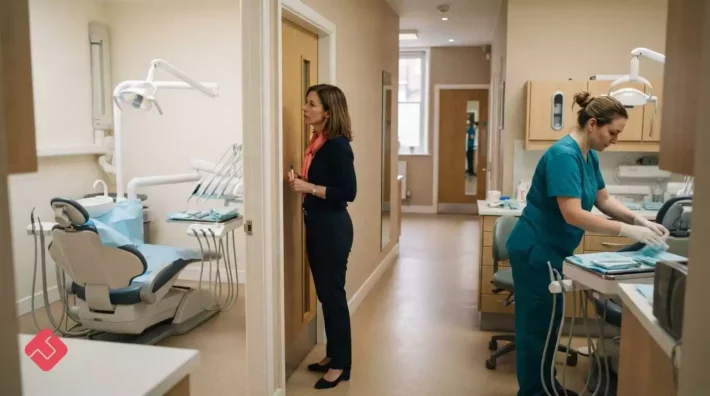
Patient financial data is not secure simply because it moves between systems. Dental PMS integration challenges include controlling what information an external platform can access, how it is transferred and what happens when schedules change. Define data flows and access boundaries before connecting systems, then test how the integration behaves in everyday use.
Caution is sensible: a calendar connection can affect appointment availability, patient records and the figures teams rely on. This article explains how integrations handle bookings, cancellations and calendar synchronisation, where API gaps can create manual work, and how cloud and on-premise deployments differ. It also outlines practical questions for assessing patient financial data security, helping dental practice leaders judge whether an integration supports efficient scheduling while protecting data.
Key Takeaways
- Map how bookings, cancellations and no-shows flow between systems to spot where schedule changes could leave chair time unfilled.
- Assess calendar synchronisation by checking how updates, cancellations and rebookings are reflected across connected tools.
- Test whether an API connection reaches the data teams actually need, especially when surface-level billing links may not reflect the PMS financial ledger.
- Weigh cloud and on-premise integration needs against internet reliability, local server maintenance and control of updates. TurnUp works alongside an existing PMS, with no migration required.
Appointment scheduling, cancellations and no-shows
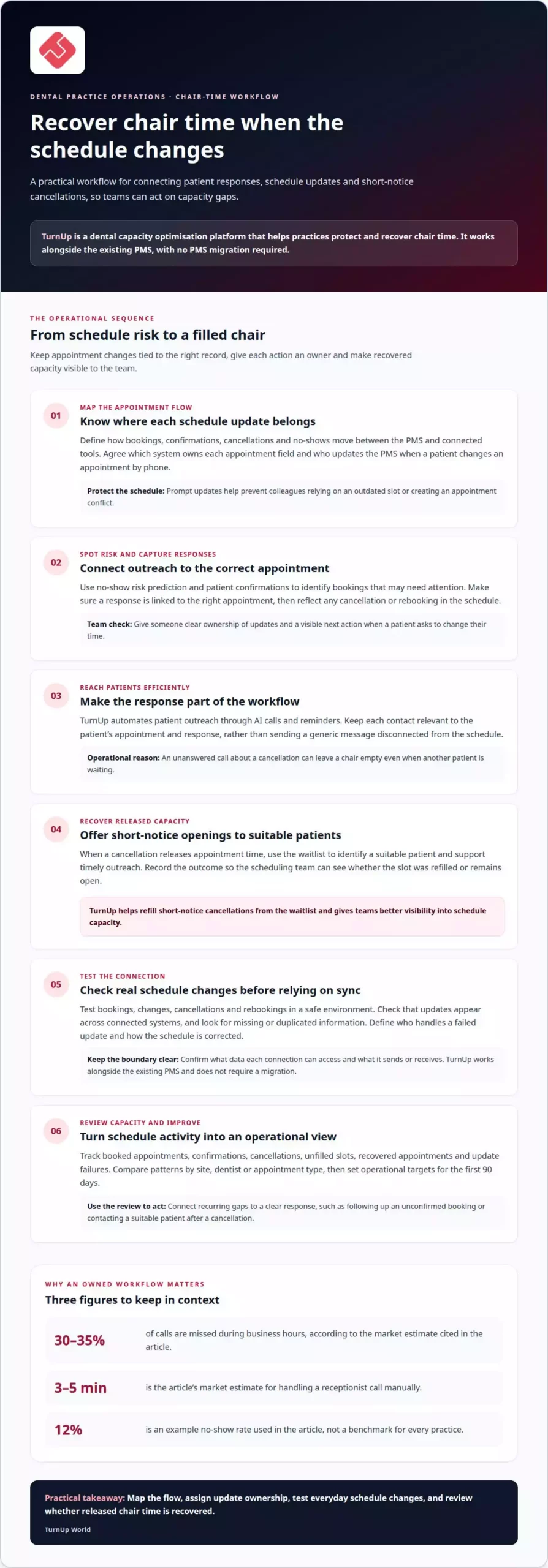
A dental PMS records appointments, but the surrounding workflow determines whether chair time stays productive. Scheduling links bookings, confirmations, cancellations and available dentist capacity. If a patient changes an appointment by phone, staff need to update the PMS promptly. Otherwise, a colleague may rely on an outdated slot and create a conflict. Clear ownership of updates keeps schedules accurate and supports a consistent experience.
Confirmations help practices identify changes before the appointment date. A reminder can prompt a patient to confirm, cancel or request another time. The value comes from linking the response to the correct appointment, rather than simply sending a message. Call routing matters too. Dental practices miss 30-35% of calls during business hours, according to the market estimate in the research. A call about a cancellation that goes unanswered can leave a chair empty, even when another patient is waiting.
Manual handling adds pressure at the front desk. A receptionist call takes 3-5 minutes to handle manually, according to the same market estimate. That time can accumulate across appointment confirmations, rescheduling and patient queries. A unified workflow can route appointment-related calls, record the outcome and make the next action visible to the scheduling team. Personalised outreach should reflect the patient’s appointment and response, not send a generic message detached from the schedule.
Late cancellations and no-shows create a second operational challenge: filling the released time. A 12% no-show rate is one example of how scheduling problems can compound, not a benchmark for every practice. A practical review should track booked appointments, confirmations, cancellations, unfilled slots and recovered appointments. Compare these measures by site, dentist or appointment type to find where gaps recur. Then connect each gap to a clear response, such as follow-up for an unconfirmed booking or contacting a suitable patient after a cancellation. This turns scheduling data into an operational view of chair capacity.
Real-time calendar synchronisation with a practice management system
Dental practice management software can support scheduling, billing and patient treatment records. Calendar synchronisation keeps appointment changes aligned across connected systems.
Calendar synchronisation across systems
Real-time calendar synchronisation means an appointment update in one connected system appears in another without manual re-entry. This matters when someone books, cancels or moves an appointment, because teams need a consistent view of available dentist and chair time. For example, if a booking changes in the PMS, a connected calendar should show the new slot before another team member offers it. During onboarding, map which system owns each appointment field and how updates flow in both directions.
Integration costs and ongoing fees
In the UK, setup and ongoing fees depend on the PMS, connection method, number of workflows and included support. There is no standard charge for every practice. Setup costs may reflect configuration, access to required data and connection testing. Depending on the agreement, ongoing fees may cover access, maintenance or support. Separate these components in the budget and weigh them against the operational work the integration removes. This clarifies the financial commitment without treating a calendar link as the whole project.
Implementation steps and timelines
The timeline depends on system access, the number of connections and the testing required. Implementation typically involves defining the scope, configuring access, testing appointments, onboarding staff and launching in a controlled way. First, specify which appointment updates must pass between systems. Then test bookings, changes and cancellations in a safe environment. Resolve mismatches before staff rely on the live calendar. Finally, explain how teams should handle failed updates, so each issue has a clear owner and recovery route.
Cloud-based dental software relies on stable business-grade internet connectivity, whilst the vendor manages hosting, backups and updates. A scalable practice management platform should also support growth across sites without fragmenting scheduling workflows. Pair synchronisation with KPI reporting: track appointment changes, unfilled slots and update failures by site. Set operational targets for the first 90 days, then use analytics to identify recurring gaps. These measures connect system performance to patient care and chair utilisation, rather than treating successful data transfer as the only outcome.
API-powered connectivity and integration gaps
APIs let dental systems exchange defined data, but a connection may not cover every workflow. Match each integration to the operational and clinical information teams need.
Common PMS integration challenges
Common challenges include incompatible data fields, restricted access and connections that transfer only part of a record. A billing link, for example, may pull summary patient data rather than the PMS financial ledger, creating manual entry or statements that do not match. Staff then need to reconcile records before acting. Define the data and workflow each connection must support, then test for missing or duplicated information.
Connectivity through APIs
An API provides a defined route for software to request or exchange data with a PMS. Its value depends on the functions and fields it exposes, not simply on its existence. Open standards or vendor-supported pathways can make connections more practical. Map what each system sends and receives, including patient identifiers, appointment details and relevant updates. Test common scenarios to ensure automation does not leave staff correcting incomplete records.
Systems connected to dental PMS
A PMS can act as an integration hub for imaging, AI radiograph analysis, e-prescriptions, clearinghouses and payment tools. Imaging findings and annotated images can connect to a patient chart and treatment plan; a clearinghouse connection can support claim submission and electronic remittance advice. Billing and accounting links need careful scoping, since a basic connection may not expose the ledger. Patient communication tools also need accurate appointment data to support patient engagement.
The most common dental PMS integration challenges are incomplete data exchange, duplicate manual work and mismatches between connected records. Map NHS BSA and NHSmail workflows separately: define the information each must exchange, use a supported connection route and test the flow before relying on it. Do not assume connecting one system automatically connects the other. For every integration, document its purpose, data fields, owner and exception process. This helps practice leaders assess whether an API supports the intended clinical or operational workflow.
Cloud versus on-premise integration considerations
Cloud and on-premise PMS setups differ in where systems run and who maintains them. This affects integration access, update management and the work needed to keep scheduling data available. Assess the operating model alongside each connection’s requirements, rather than treating deployment as a technical detail.
With a cloud-based PMS, the vendor manages hosting, backups and updates. The practice still needs stable, business-grade internet connectivity to access the system. A connectivity outage can disrupt scheduling, billing and patient communication workflows that depend on online access. Map which tasks require the PMS, such as checking appointment changes or treatment plans, and decide how staff will handle interruptions. Include connected reminders and patient engagement tools in the review.
An on-premise PMS runs on local servers hosted and maintained by the practice. The practice is responsible for backups, hardware, IT support and updates, including software patching, security updates and version control. These duties can affect integration reliability: an outdated system or missed patch may disrupt a connection. Assign clear maintenance ownership and document how teams handle failed updates, so the response does not depend on one person’s memory.
For a practical comparison, list each connected workflow, its dependencies and its business impact. For example, note whether appointment synchronisation needs internet access, whether billing relies on a local server and how patient data is backed up. Then compare the ongoing work and costs of maintaining each environment, including infrastructure, support and update responsibilities. For a multi-site group, consider whether practices follow the same process or manage separate systems. A consistent operating model can make reporting on chair utilisation, cancellations and revenue easier to interpret. The right solution is one whose support model, connectivity and maintenance responsibilities fit daily operations.
TurnUp World
TurnUp World helps dental practices and multi-site DSOs protect chair time and recover lost production. TurnUp works alongside the existing PMS, with no migration required. When no-shows and short-notice cancellations leave capacity unused, TurnUp predicts no-show risk, automates patient outreach through AI calls and reminders, and uses the waitlist to refill short-notice cancellations. Teams can address both the missed appointment and the resulting gap in the schedule, rather than treating reminders as the whole solution. TurnUp also provides visibility into schedule capacity to support operational decisions across sites. TurnUp is relevant when keeping chairs filled while retaining the current PMS is a priority. Book a demo to discuss your practice’s scheduling needs.
Turn integration priorities into operational gains
Before choosing the next change, align practice leadership, operations and front-desk teams on which workflows need to stay consistent across sites and where local flexibility matters. This gives discussions about dental PMS integration challenges a practical focus: an operating model your teams can support, not technology for its own sake. Record the agreed priorities and who will decide when needs differ between locations.
TurnUp World can be part of that conversation when scheduling operations are a priority. Contact TurnUp World about integration to discuss the needs of your practice or group. A clear shared direction gives your team a more confident starting point.
Frequently Asked Questions
Is patient financial data secure during the sync?
Data can be protected when an integration limits access and transfers information for a defined purpose. Before enabling a connection, identify whether it needs ledger-level details or only appointment information. For example, a calendar tool may not need balances or payment history. Restrict permissions to the necessary fields, document who can access them and test that users cannot see unrelated financial records.
How do data migration and duplicate patient records affect dental PMS integration?
Migration can introduce inconsistent patient details into a new workflow, while duplicate records can split appointment or financial histories. For example, a patient listed under two spellings may appear to have separate bookings. Before a system change, establish how records will be matched, how duplicates will be reviewed and which record will be authoritative. Validate sample records in a test environment before staff use the live system.
What interoperability standards and APIs do UK dental PMS platforms support?
Support varies by PMS and connected application, so do not assume every UK practice uses the same interface. Identify which vendor-supported pathways or open standards connect the specific systems in scope, then map the fields and actions each connection supports. A practical test is to trace an appointment update from source to destination and confirm that its identifiers, status and timing remain usable.
What UK GDPR and NHS data security requirements apply to dental PMS integrations?
Assess the integration against the UK GDPR and the information governance controls relevant to any NHS data involved. Review the purpose for using the data, the fields shared, access permissions, retention, security arrangements and each organisation’s responsibilities. Involve the practice’s privacy or information governance lead to assess the actual data flows and agreements, rather than assuming a technical connection alone establishes compliance.
How can a practice reduce downtime and staff disruption during dental PMS integration?
Reduce disruption by testing the integration before relying on it in daily operations. Use a test environment to check representative workflows, including an appointment change, an access issue and a failed update. Plan onboarding around staff tasks, identify who handles exceptions and keep a clear manual fallback for essential scheduling work. A staged launch can reveal workflow issues before wider adoption.
What security, privacy and operational risks can arise from dental PMS integrations?
Risks include exposing more patient data than a workflow needs, granting excessive access, creating mismatched records and losing visibility when an update fails. A billing connection, for instance, could produce conflicting balances if teams rely on different records. Reduce these risks by documenting data flows, assigning ownership for exceptions and reviewing access and reconciliation procedures when connected systems or practice workflows change.