
Managing UDA targets in a dental practice starts with knowing what the contract requires and whether the diary can support delivery. Cancellations and unfilled appointments can quietly reduce available chair time, while a headline activity figure may not show whether progress is keeping pace.
Practice leaders need more than a year-end total. They need a clear view of the contract target, activity delivered and capacity still available, so they can act early without letting performance pressure override patient care. This guide explains what to check in your contract, how to review delivery consistently and how to spot gaps before they become harder to address. It also covers practical ways to protect and recover chair time through responsible scheduling workflows. TurnUp World supports this operational view with capacity insights, no-show risk prediction and cancellation recovery, working alongside your existing practice management system without requiring a migration.
Key Takeaways
- When managing UDA targets in a dental practice, check the applicable contract and confirm the target and reporting period.
- Compare delivered activity with reliable practice records and review progress regularly to spot gaps early.
- If capacity is lost, review cancellations and suitable available appointments. Keep clinical need, not target pressure, at the centre of decisions.
- Use chair-capacity insights to guide operational action, not contract interpretation. TurnUp works alongside your existing PMS without requiring a migration.
What managing UDA targets in a dental practice actually involves
A Unit of Dental Activity (UDA) is a measure used to record NHS dental activity under relevant contracts. The activity credited for a course of treatment depends on the applicable contract and its rules. A UDA target is not a universal appointment quota. The overview of Units of Dental Activity provides background, but check your contract and current authoritative guidance to confirm how the rules apply to your practice.
For practice leaders, managing UDA targets means keeping two questions distinct: what activity the contract requires, and whether the diary has enough suitable clinical capacity to support delivery. The target is contractual; sessions, clinician availability and bookable appointments are operational. Capacity insight can help with planning, but it cannot interpret the contract or determine clinical decisions.
Which contract details should a practice check first?
Start with the applicable contract and current authoritative NHS guidance for your nation. Confirm the agreed target, reporting period and any relevant definitions before calculating progress. Don’t rely on a generic online formula or assume another practice’s terms apply. Record the source and date of the guidance, then make sure everyone reviewing delivery is using the same basis.
Why target management is also a capacity question
A correctly understood target still won’t show whether the practice has enough bookable time ahead. Review available clinical sessions alongside appointments that can actually be offered. Check where cancellations, unfilled slots or changes to clinician availability are reducing delivery opportunities. TurnUp adds visibility into chair utilisation and scheduling capacity, and can help teams predict no-show risk and refill short-notice cancellations from the waitlist. It works alongside the existing PMS, with no PMS migration required.
How to track UDA progress and spot a delivery gap early
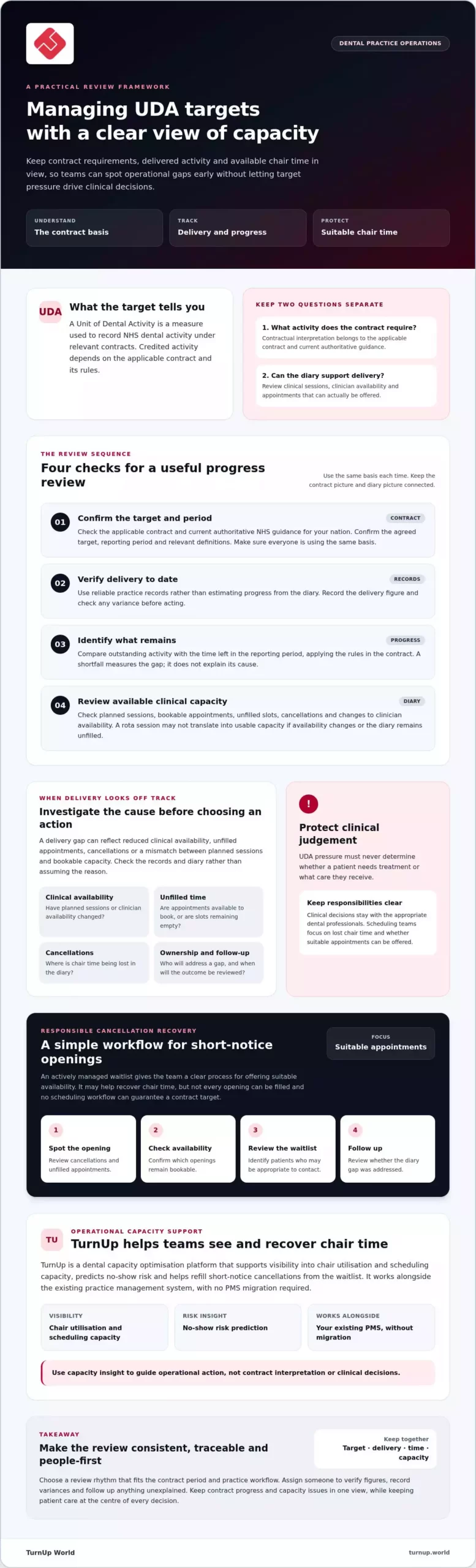
A consistent review turns a contract target into a clearer operational picture. Use the same checks each time:
- Confirm the target and period. Refer to the applicable contract and current authoritative guidance.
- Verify delivery to date. Use reliable practice records rather than an estimate based on the diary.
- Identify what remains. Compare outstanding activity with the time left in the reporting period, using the contract’s rules.
- Review available capacity. Check planned clinical sessions, bookable appointments, unfilled slots, cancellations and changes to clinician availability.
A shortfall measures the gap, but it doesn’t explain the cause. Reduced clinical availability, unfilled appointments, cancellations or a mismatch between planned sessions and bookable capacity may all affect delivery. Check the records and diary before deciding what action to take.
Build a useful UDA progress review
Choose a review rhythm that fits the contract period and the practice workflow. Assign someone to verify the figures, record variances and follow up anything unexplained. Keep the target, delivery figure, remaining period and capacity issues together in one view. That makes changes easier to trace and gives the team a consistent basis for action.
Connect associate schedules with available capacity
Compare planned associate sessions with appointments actually available to book. A session on the rota may not translate into usable capacity if availability changes or the diary remains unfilled. Review the schedule with the relevant associate or operations lead, agree who will address any gaps, then check the outcome. TurnUp provides visibility into chair utilisation and scheduling capacity alongside the existing PMS, without requiring a migration. For teams looking to identify and recover lost chair time, TurnUp’s dental capacity optimisation platform can support that operational review.
Addressing UDA delivery gaps without compromising care
A delivery gap calls for an operational response, not a change to clinical judgement. UDA pressure must never determine whether a patient needs treatment or what care they receive. Keep clinical decisions with the appropriate dental professionals. Scheduling teams can focus on whether chair time is being lost and whether suitable appointments can be offered.
Start with the immediate diary impact. Review cancellations and unfilled appointments, check which openings remain bookable, then identify patients on the waitlist who may be appropriate to contact. An actively managed waitlist gives the team a clear process for offering short-notice availability. It may help recover chair time, but not every opening can be filled and no scheduling workflow can guarantee a contract target.
Recover short-notice cancellations responsibly
Assign clear ownership for spotting an opening, checking its appointment requirements and contacting suitable patients. Follow the practice’s booking procedures and record the outcome, so another team member can see whether the slot was filled. For a hygiene-specific example, consult the practice’s established guidance on filling hygiene diary gaps.
Keep patient needs ahead of target pressure
Scheduling actions should follow the practice’s clinical processes and professional judgement. Don’t use a target to steer patients towards care they don’t need or treat appointments as interchangeable. If the same type of gap keeps recurring, investigate the workflow or capacity issue. For example, cancellation follow-up may be delayed, or planned sessions may not match bookable appointments. Avoid blaming patients; use the pattern to improve the process.
For practices managing UDA targets, TurnUp can support cancellation recovery by helping teams manage waitlists and see schedule capacity. It works alongside the existing PMS and doesn’t require a migration. Explore TurnUp’s dental capacity optimisation platform to see how it can support chair-time recovery.
Make UDA management more proactive with capacity visibility
Managing UDA targets works best as a repeatable operational cycle: review delivery against the applicable contract, identify where chair time has been lost, assign an action and check what happened next. Capacity insights help teams decide where to focus, but they don’t replace contract interpretation or determine how activity should be counted.
Connect performance figures to diary activity. If delivery is behind plan, check whether cancellations, unfilled appointments or changes to clinical availability have reduced bookable capacity. Record the action taken and whether it recovered an appointment opportunity. This helps distinguish a one-off disruption from a recurring workflow issue.
What capacity optimisation can add to the workflow
TurnUp brings together no-show risk prediction, an AI Call Center for appointment confirmation, cancellation and rebooking, and waitlist management for short-notice cancellations. These workflows can help teams follow up on appointments and offer suitable openings. Chair utilisation reporting and scheduling capacity insights give practice teams and multi-site leaders a clearer view of where capacity is available or being lost. The tools support operational decisions, not clinical judgement or contract calculations.
TurnUp works alongside the practice’s existing PMS. A PMS migration isn’t required.
Choose a practical next step for your practice
Map the process from target review to cancellation recovery. Note who checks delivery, who spots an opening, who contacts suitable patients and who reviews the outcome. Look for unclear handovers or steps that rely on someone noticing a gap manually. Then agree one change to test and how the team will assess whether it helped protect or recover chair time.
To explore how a capacity optimisation platform can support this workflow, review TurnUp’s approach to dental capacity optimisation.
Keep UDA delivery visible and act early
Effective management of UDA targets in a dental practice starts with a clear view of the applicable contract, reliable delivery figures and the time and appointments available. Review these together regularly. If activity falls behind plan, investigate the cause, such as cancellations or reduced clinical availability, then assign an operational action and check its outcome.
Capacity management can help recover chair time, but it must never dictate clinical need or treatment decisions. A consistent, patient-focused workflow gives teams a clearer way to address lost capacity before it becomes harder to recover.
TurnUp supports dental capacity optimisation through no-show prevention, AI calls for appointment confirmation, cancellation and rebooking, short-notice cancellation recovery and chair utilisation reporting. It works alongside your existing PMS and doesn’t require a migration. Explore how TurnUp supports dental capacity optimisation and assess whether greater visibility could strengthen your practice’s workflow.
Clear contract checks and timely operational action help your team manage delivery while keeping patient care at the centre.
Frequently Asked Questions
What does a UDA target mean in a dental practice?
A UDA target is an agreed measure of activity under a relevant NHS dental contract. The contract and applicable guidance determine how activity is counted and how the target applies, so check your own terms rather than relying on generic examples. When managing UDA targets in a dental practice, track delivery against reliable records and review it alongside available appointments, clinical sessions and schedule changes.
How often should a dental practice review UDA progress?
Review progress often enough to identify changes and act before the reporting period ends. The right cadence depends on the contract and the practice’s workflow, so choose a schedule the team can maintain. At each review, compare delivered activity with reliable practice records, then check clinical sessions, cancellations and unfilled appointments. Assign someone to verify the figures and follow up unexplained differences.
Can a dental practice meet UDA targets without compromising patient care?
Target management can support operational planning without determining clinical decisions. Keep patient need and professional judgement central, and use accurate contract information to understand delivery. If progress is behind plan, investigate operational factors such as lost chair time, cancellations or changes to clinical availability. Don’t encourage inappropriate treatment or promise that a particular scheduling action will achieve the target.
Can capacity optimisation software replace a dental practice management system?
No. TurnUp is a dental capacity optimisation platform designed to work alongside an existing practice management system, with no PMS migration required. It supports workflows such as no-show prevention, AI calls for appointment confirmation, cancellation and rebooking, short-notice cancellation recovery and schedule-capacity visibility. Practices can assess how these capabilities fit their current processes and system environment. Capacity insights support operational decisions, but they don’t replace contract interpretation or clinical judgement.