
What if centralising scheduling made local teams more responsive, not less? For dental groups, coordinating appointments across sites can expose inconsistent workflows, make performance harder to compare and leave central teams without the context they need to manage local capacity. Short-notice cancellations add pressure: an empty chair is lost production time unless teams can act quickly. Centralised scheduling for dental groups works best when shared visibility supports local judgement rather than replacing it.
This guide explains how to build a consistent, visible scheduling workflow while keeping site-level needs in view. You’ll learn how to standardise key processes, respond to cancellations through a repeatable waitlist workflow and track capacity so group leaders can act. TurnUp World supports this approach as a dental capacity optimisation platform. It works alongside your existing PMS, with no migration required, and helps teams predict no-show risk, automate outreach and recover cancelled slots. The result is a clearer view of chair time without taking decisions out of local hands.
Key Takeaways
- Set shared scheduling standards without moving every appointment decision away from the practice team.
- Separate central and local responsibilities so each site knows who owns each stage of the workflow.
- Use a process map, responsibility matrix and reporting view to make the group model practical and measurable.
- Connect capacity insight with action to protect chair time through centralised scheduling for dental groups.
What centralised scheduling for dental groups means in practice
Centralised scheduling for dental groups is the coordinated oversight of appointment workflows across multiple sites, using shared standards and capacity visibility while leaving relevant booking decisions with local teams. It gives the group a joined-up view without requiring every appointment to be managed from one central desk.
Scheduling means allocating time and resources to planned activity. The general What is Scheduling? overview offers useful context, but a dental group must also account for differences in appointment types, chair availability and local workflows. Without common definitions, a report may group different activity under the same label, making site performance difficult to compare.
What should a dental group centralise?
Centralise the processes that benefit from consistency: definitions for bookings, cancellations and schedule capacity; group reporting; and a clear workflow for responding to released appointments. Just as expanding healthcare groups rely on platforms like DuraSuite to standardise core internal HR and payroll operations, a shared scheduling framework gives leaders a comparable operational view. Keep site-specific appointment templates and local context with the practice team. A central team can coordinate follow-up and highlight available capacity, while local staff apply their knowledge of the schedule and appointment requirements.
Why does multi-site scheduling need a different approach?
At a single practice, staff can often resolve booking questions through day-to-day familiarity. Across sites, different ways of categorising or recording appointments can obscure whether capacity is genuinely comparable. A shared view helps leaders spot where schedules differ and ask better operational questions. It informs decisions, but it does not guarantee a particular result or mean every site should operate identically.
Start by agreeing which workflow stages and measures must be consistent, then document where local discretion applies. TurnUp connects group-level visibility with capacity optimisation, combining appointment-level no-show risk insight and cancellation recovery with AI calls and reminders for confirmation and follow-up. The aim is to help teams protect chair time, not simply send reminders.
Build a group scheduling model that preserves local context
Set the standard centrally; leave decisions that depend on local knowledge with the practice team. This operating principle makes consistency compatible with local decision-making. Define shared workflow stages and escalation routes, then make clear where site teams retain authority over appointment templates and scheduling context.
| Central team | Site team |
|---|---|
| Maintain shared booking, cancellation and capacity definitions. | Apply appointment templates that reflect the practice’s local requirements. |
| Coordinate group-wide cancellation workflows and escalation routes. | Assess local schedule context and decide whether an available slot is suitable. |
| Consolidate operational reporting to support comparison across sites. | Keep appointment information accurate and flag exceptions for review. |
Which scheduling decisions belong centrally?
Central teams should own the operating framework: common workflow definitions, visibility of capacity across sites and consolidated reporting. They can coordinate follow-up when a cancellation creates an opening, then route exceptions to the relevant practice. The site team should retain decisions that depend on appointment suitability, local templates or the day’s operational context. For groups navigating the wider workforce structuring that comes with multi-site coordination, outsourced HR specialists such as sullivangrouphr.com can assist in aligning personnel management across locations.
How can sites keep useful autonomy?
Set a simple boundary: central teams coordinate the process; practice teams resolve exceptions that need local judgement. For example, a shared cancellation workflow can define how an open slot is surfaced and escalated, while the practice decides whether it fits the schedule. AHRQ’s Dental Care Challenges and Scheduling Strategies discusses scheduling alongside dental care and patient flow, highlighting why operational processes need to account for practice context.
Document these boundaries in a responsibility matrix and review them as sites join or change workflows. Clear shared processes can also support integrating new practices into a dental group. TurnUp’s dental capacity optimisation platform connects capacity visibility with chair-time recovery to support this operating model.
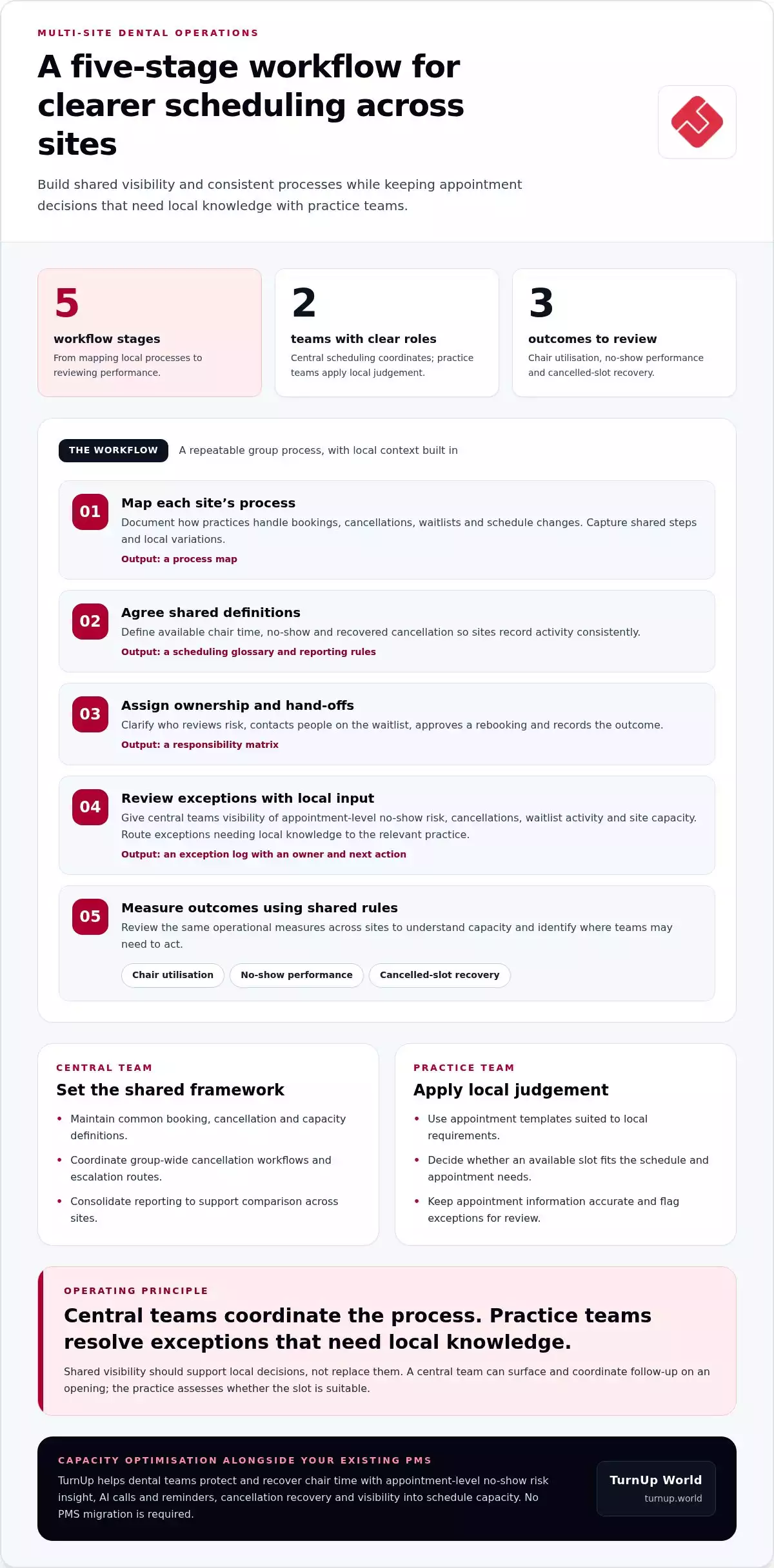
Use a practical workflow to coordinate dental schedules across sites
Make the group model operational with a repeatable sequence: map each site’s process, agree shared definitions, assign ownership, review exceptions and measure outcomes. This gives central teams a consistent way to spot capacity issues while preserving local input where the schedule needs it.
- Map site processes. Document how each practice handles bookings, cancellations, waitlists and schedule changes. Output: a process map showing common steps and local variations.
- Agree shared definitions. Define terms such as available chair time, no-show and recovered cancellation so sites record activity consistently. Output: a short scheduling glossary and agreed reporting rules.
- Assign ownership. Specify who reviews risk, contacts people on the waitlist, approves a rebooking and records the outcome. Output: a responsibility matrix with clear hand-offs between central and site teams.
- Review exceptions. Give the central scheduling team a view of appointment-level no-show risk, cancellations, waitlist activity and site capacity. Route exceptions requiring local knowledge to the relevant practice. Output: an exception log with an owner and next action.
- Measure outcomes. Review chair utilisation, no-show performance and cancelled-slot recovery using the shared definitions. Output: a group reporting view that lets leaders compare sites and investigate differences without setting unsupported universal targets.
Turn cancellations into a managed workflow
When a slot opens, record the cancellation, assign follow-up, identify suitable waitlist options and pass the proposed rebooking to the right team for action. Track whether the slot was refilled and, if not, why. This makes missed recovery opportunities visible. For practical front-desk process ideas, see streamlining dental reception tasks.
Centralised scheduling for dental groups becomes actionable when teams connect capacity insight with follow-up. TurnUp supports this workflow with appointment-level no-show risk prediction, automated outreach and short-notice cancellation recovery. Its reporting helps teams distinguish recovered slots from those still open, making hand-off gaps easier to investigate. Explore TurnUp’s capacity optimisation platform to see how it supports group scheduling operations.
Connect centralised scheduling with active chair-time recovery
Shared visibility matters when it helps teams act. A central view can show which individual appointments have a predicted no-show risk, which sites have cancellations and whether waitlist follow-up has refilled released chair time. Leaders can review recovery across the group, while each practice retains sight of its own schedule and local context.
How does TurnUp support scheduling operations?
TurnUp is a dental capacity optimisation platform, not just a reminder tool or general scheduling system. Its No-Show Radar scans schedules and flags predicted no-show risk for individual appointments, with a risk percentage for each appointment. Teams can use automated confirmation and rebooking, call-centre integration and waitlist slot filling to respond to risk and cancellations. TurnUp works alongside an existing PMS, so no PMS migration is required.
TurnUp reports a ‑38 % average reduction in no-shows and fills a cancelled slot in 4 minutes. 120+ practices & DSOs use the platform. These figures provide context, not a guaranteed result for every group. Measure your own baseline and track changes using consistent definitions for no-shows, chair utilisation and cancellation recovery.
What should leaders assess before adopting a platform?
Use a practical decision check. Can the workflow give group leaders a comparable view of capacity without removing site-level context? Can teams identify appointment-level risk, manage cancellation follow-up and see whether waitlist activity recovers a slot? Can reporting connect these actions to chair utilisation and no-show performance? These questions help frame an assessment of dental capacity management.
Start by agreeing the measures you’ll review, who owns each follow-up and how local exceptions are recorded. Then assess whether a capacity optimisation platform supports that operating model alongside your current workflows.
Make your next scheduling decision measurable
Turn the operating model into a focused test. Choose one scheduling workflow, such as cancellation follow-up, and agree who owns each hand-off, what local teams need to decide and which outcome the group will review. Use the results to refine the process before extending it across more sites. Practice teams get a clear role, and group leaders get evidence to guide the next operational decision.
Strong centralised scheduling for dental groups isn’t about removing variation for its own sake. It’s about making useful patterns visible, then acting on them without losing the context behind each practice’s schedule. TurnUp supports this approach as a dental capacity optimisation platform that works alongside your existing PMS.
See how TurnUp could fit your group’s scheduling workflow. Book a demo to explore a more visible, responsive approach to chair capacity.
Frequently Asked Questions
How should a dental group handle sites with different opening hours?
Keep each site’s actual opening hours visible in its local schedule and group reporting. When coordinating an appointment or cancellation, the central team should ensure the proposed time falls within the relevant site’s operating hours. A slot released at one practice should not be treated as available group capacity if another site is closed or cannot accommodate that appointment at that time.
Which appointment types are suitable for centralised scheduling?
Start with appointment workflows that follow clear shared rules, such as confirmations, cancellation notifications and waitlist follow-up. Keep decisions about clinical suitability with the appropriate practice team. A central coordinator can identify an open slot and a suitable waitlist option, while the site team confirms that the appointment fits its template and local requirements before booking. For decisions about chair allocation and appointment lengths, see dental group capacity planning.
Does centralised scheduling mean one team must book every appointment?
No. Centralised scheduling for dental groups can coordinate shared processes without placing every booking decision with one team. A central team might monitor cancellations and direct follow-up, while local staff handle requests that depend on site knowledge. Set a clear hand-off by defining what the central team can action and which cases must return to the practice for review.
How can a dental group introduce centralised scheduling without disrupting its existing PMS?
Introduce the workflow alongside the existing PMS rather than making a system replacement the first step. TurnUp sits on top of an existing PMS, with no migration required. Begin by documenting how teams currently record bookings and cancellations, then agree where information and follow-up sit in the shared process. This gives practices a practical way to improve coordination while retaining familiar PMS workflows.