
What if the front desk could protect focused admin time without making patients wait longer? Calls, arrivals and appointment changes rarely follow a neat timetable, so a rigid calendar can quickly become another thing to manage. Time blocking for dental reception staff works best when it gives essential tasks a clear place in the day while leaving capacity to respond to patient needs.
Follow-ups and admin matter, but busy periods can push them aside. This guide explains how to prioritise recurring work, reserve realistic focus periods and keep front-desk cover in place. It also shows how the team can review and refine the routine. Time blocks organise staff work; automation can help manage appointment workflows. TurnUp World supports no-show prevention, AI-powered appointment outreach, cancellation recovery and waitlist management alongside your existing PMS, without requiring a migration.
Key Takeaways
- Use time blocking for dental reception staff to plan essential work, while leaving room to respond to changing patient needs.
- Group tasks by urgency, focus and how easily they can be paused. Confirm front-desk cover before scheduling admin time.
- Start with a few recurring priorities, make task ownership clear and review the routine with the team.
- Pair clear handovers with appointment workflow automation to manage cancellations and capacity alongside your existing PMS.
Dental Reception Time Blocking Needs Room for Interruptions
Time blocking means assigning a task or group of tasks to a planned period, rather than waiting for spare moments. At a dental reception desk, the plan must account for live service: a patient arriving, a call needing attention or an appointment change can interrupt admin without warning. A block gives work a place in the day, not a guarantee that it will happen without interruption.
Flexible time blocking for dental reception reserves attention for planned work while keeping patient-facing cover available. Focused admin and front-desk coverage are separate needs, so the rota should show who is available before anyone steps away from the desk. For a general overview of the method, What is Time Blocking? explains how people assign work to planned periods.
Which reception tasks benefit most from a planned block?
Schedule repeatable tasks that need concentration but can usually wait for their planned period, such as routine follow-ups, correspondence and administrative record updates. Group similar work to reduce the effort of switching between tasks. By contrast, an urgent patient request or time-sensitive appointment change may need attention straight away. Keep clinical decisions and advice with the appropriate clinical team.
Before protecting a focus block, make coverage explicit. For example, one team member can handle arrivals and calls while another updates records. If no one is covering the desk, the block is not protected in a way that works for patients.
Why a rigid timetable can fail at the front desk
A fixed sequence assumes the day will go to plan. A call about an appointment change might arrive just as someone starts correspondence, and a walk-in may extend the interruption. Treat the timetable as a priority order, not a minute-by-minute performance target.
If a block is displaced, note what remains and assign it to the next suitable open period. Agree with a colleague who owns the handover. This turns a missed block into a scheduling decision, not a reason to blame staff. The aim of time blocking for dental reception staff is reliable follow-through while maintaining patient access, not an untouched calendar.
Design dental reception time blocks around task type and demand
Build each block around the attention a task needs, its deadline and how easily it can be paused. A quick, repeatable update needs a different plan from work that involves checking several records or coordinating with colleagues. Block length should reflect task complexity and actual reception demand. Shorter periods can make it easier to return to interruptible work without losing track of the next step.
Build a simple task map before assigning blocks
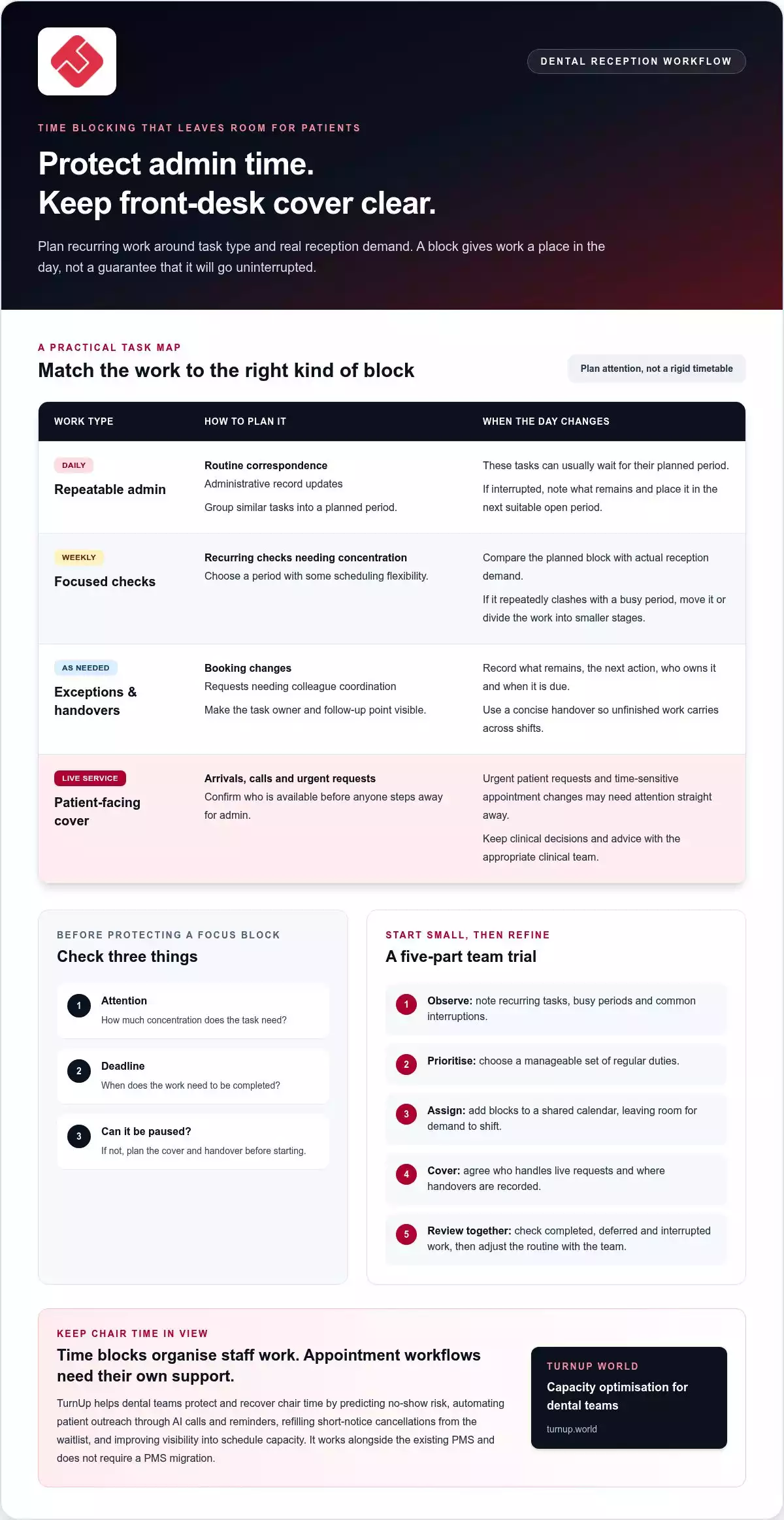
Start with a short list of reception duties, grouped by when they arise. Use it to plan staff attention, not to duplicate the practice’s scheduling procedures. For each task, note what it requires, when it is due and whether it can wait if the desk becomes busy.
- Daily tasks: routine correspondence and administrative record updates.
- Weekly tasks: recurring checks that need focused attention but have some scheduling flexibility.
- Exception-based tasks: work prompted by a booking change or a request requiring colleague coordination.
Add a simple marker for concentration, patient contact or colleague input. This helps the team place tasks in suitable blocks and spot dependencies before work begins. For example, if a task depends on information from a colleague, record who will follow up and when, rather than leaving it in an open-ended slot.
Set coverage and interruption rules
Before assigning focused admin, confirm who is covering live requests. Agree which requests need immediate attention and what can move to the next suitable period. Keep the owner and deadline visible for deferred work. Apply the same principles across shifts, using concise handovers to pass on unfinished tasks.
Use the plan to test what fits. If a block repeatedly coincides with a predictable rise in front-desk demand, move it or divide the work into smaller stages. This makes time blocking for dental reception staff responsive to the actual workload, rather than an idealised timetable.
How to start time blocking at a dental reception desk
Make the first version a small trial, not a complete redesign of the rota. Keep appointment procedures in the practice’s scheduling SOP and use the time-blocking plan to organise staff attention around recurring work.
- Observe the work. Note recurring tasks, busy periods and the interruptions that commonly affect reception.
- Choose priorities. Select a manageable set of regular duties that benefit from planned attention.
- Assign blocks. Put the tasks into a shared calendar or team-visible plan, leaving room for demand to shift.
- Agree coverage. Make clear who handles live requests and where colleagues should record a handover.
- Review together. Compare the plan with how the day unfolded, then adjust it with the team.
Make task ownership visible. A colleague taking over should be able to see what remains, the next action and who is responsible. This reduces reliance on memory and keeps the plan practical across shifts.
Run a short trial and adjust the plan
Compare planned tasks with completed work. Note whether delays came from patient-facing demand, unclear ownership or a block that was difficult to pause. Move or reshape blocks that repeatedly clash with reception activity. Ask staff which changes reduce friction and which create extra steps. Use their feedback to improve the routine, not to assess individuals.
Review the routine without adding reporting burden
Track a few useful signals: tasks completed, tasks deferred and recurring interruptions. Capture them in the shared plan rather than creating a separate reporting process. Review patterns as a team and agree one practical adjustment. For example, if the same task keeps being deferred, reconsider its timing or clarify who owns it.
Keep the review focused: retain what helps the team complete essential work, change what repeatedly gets in the way and avoid steps that do not improve the routine. A simple, visible plan gives the front desk a practical basis for refinement.
Keep time blocks workable as appointments and capacity change
A time block helps the team organise attention, but it does not determine whether an appointment is attended or a cancellation is filled. Its value is making the next action clear when the schedule shifts. If an appointment changes during focused admin, the person responding can record the update and pass any unfinished task to a named colleague or the next suitable block.
Connect planned admin with appointment workflows
Keep appointment changes and staff task planning visible as separate but connected parts of the workflow. A cancellation may create follow-up work, while a rebooking may need coordination across the team. Clear ownership helps reception staff act on a schedule change without losing track of the task that was interrupted. Time blocks create space for that work, while the team’s agreed process sets out how each change is handled.
Choose a next step that fits the practice
Keep the routine practical: reserve time for priority work, maintain patient-facing cover and use handovers to pick up interrupted tasks. Review where appointment changes affect planned work, then adjust the routine to match how the practice operates. This turns time blocking for dental reception staff into a working approach that adapts as demand shifts, rather than a timetable the team must follow regardless of the day.
Choose one point in the current routine that regularly becomes difficult when appointments change. Agree who owns the next action and how the task will be handed over, then refine the approach using the team’s experience.
Build a reception routine that can grow with demand
Time blocking for dental reception staff can become more than a daily diary. Treat it as part of how the practice adapts its operational rhythm as appointment demand changes. A clear routine helps managers see where staff attention is needed and where capacity workflows could operate more efficiently.
Connect front-desk organisation with a wider view of chair capacity. TurnUp is a dental capacity optimisation platform that helps practices manage scheduling operations alongside their existing PMS. It predicts no-show risk, automates patient outreach through AI calls and reminders, helps refill short-notice cancellations from the waitlist and improves visibility into schedule capacity. It works alongside the existing PMS and does not require a migration.
Explore how TurnUp can help your practice protect and recover chair time. Explore TurnUp’s dental capacity optimisation platform.
Frequently Asked Questions
What is time blocking for dental reception staff?
Time blocking for dental reception staff means setting aside planned periods for defined duties while keeping patient access and urgent work in view. It is a flexible guide, not a minute-by-minute rule. For example, a receptionist might reserve a period for routine follow-ups, then move that work if a patient needs immediate help or a time-sensitive booking issue needs attention.
Can time blocking work in a busy dental practice?
Yes, if the plan expects interruptions rather than treating them as exceptions. First establish who maintains front-desk cover, then agree what needs immediate action and what can wait. If a rush of arrivals repeatedly interrupts a task, try placing it at a quieter point or assigning another team member to cover. Reception staff’s experience should shape these adjustments, not a rigid timetable.
How should reception staff prioritise tasks during a time block?
Rank work by urgency, patient impact, deadline and whether a colleague is waiting on it. A patient at the desk or a live booking issue may need attention before a routine record update. The update still matters, but can be assigned a later slot. Agree how to flag deferred work and hand it over. Keep clinical judgement and advice with appropriately qualified colleagues.
What should a dental reception team do when a time block is interrupted?
Briefly record where the work stopped, resolve or hand over the immediate need, then decide whether to resume, shorten or reschedule the task. An interruption is part of front-desk demand, not automatically a failure. If the same block is repeatedly disrupted, look for a pattern: cover may be unclear, ownership may be missing or the task may sit at the wrong point in the day.
Does time blocking replace dental practice management software?
No. Time blocking organises staff work; it does not replace a practice management system (PMS). TurnUp works alongside an existing PMS and does not require migration. Its dental capacity optimisation workflows support no-show prevention, appointment confirmation, cancellation and rebooking through AI calls, and short-notice cancellation recovery through waitlist management. These workflows help teams manage chair capacity while the PMS remains their core practice system. The two serve connected but distinct operational roles.