
A full diary can still lose chair time when team members handle bookings, changes and cancellations differently. A dental front desk scheduling SOP gives every appointment change a clear next step and owner, so opportunities to refill the diary do not get lost between calls or handovers.
To improve consistency without adding unnecessary administration, define how staff book and amend appointments, who acts when a patient cancels, and how the waitlist is used to offer newly available time. Keep the procedure close to the work: staff should be able to find the right action quickly while speaking with a patient or managing the schedule.
This guide sets out how to map the workflow, clarify handovers and review whether the process protects and recovers chair time. It also explains where automation can support patient outreach and cancellation recovery. TurnUp World works alongside your existing PMS and does not require a PMS migration.
Key Takeaways
- Use a dental front desk scheduling SOP to define the action, owner, record and handover at each appointment stage.
- Map the appointment lifecycle from request through attendance and outcome so staff know what to do next.
- Set boundaries for routine schedule changes and identify when a manager needs to take ownership.
- Review schedule gaps, pending cancellation actions and follow-ups to identify where the process can recover more chair time.
Why a dental front desk scheduling SOP protects appointment continuity
A dental front desk scheduling SOP is the documented process for managing appointment requests, bookings, changes, cancellations and follow-up. It states what staff record, who updates the schedule and how unfinished actions pass to the next person. The aim is consistent administration, not a script for every conversation. Staff can respond to each patient’s circumstances while following the same core steps.
Consistent records make the diary easier to understand across shifts and sites. When a patient cancels, the schedule should show what happened, whether the slot is available and who owns the next action. That visibility helps the team act on open chair time rather than letting a gap sit unnoticed. It also supports continuity of care in healthcare, where consistent information and coordination help care proceed across interactions.
What a scheduling SOP covers, and what it does not
Keep the document focused on administrative scheduling. It does not need to become a full reception training manual or clinical protocol; while wider staff development, medical emergency preparation and CPD courses may be handled through organisations such as First Medical Training Ltd, the scheduling SOP should remain dedicated to day-to-day diary management. Define each handover: reception or the central scheduling team records bookings and updates; the person receiving a cancellation triggers the agreed follow-up; and the practice manager handles issues outside routine administrative authority. Clinical judgement, diagnosis and treatment advice remain outside the scheduling procedure. If a patient raises a clinical question, staff should route it through the practice’s appropriate clinical process rather than decide the answer at the desk.
Where inconsistent scheduling creates avoidable gaps
Unclear ownership creates a familiar failure point: one person records a cancellation, another assumes someone else will contact patients, and the newly available slot remains unfilled. A similar problem occurs when a booking change is discussed but not entered in the schedule, leaving colleagues with an outdated view. Use one straightforward rule: every change needs an up-to-date record, a named next action and an owner.
Chair utilisation is the proportion of available clinical chair time used for scheduled appointments. Reviewing it alongside unresolved cancellations helps managers see whether the process is protecting capacity. A busy diary alone does not show whether schedule changes are being managed consistently.
Build the dental scheduling SOP around one appointment lifecycle
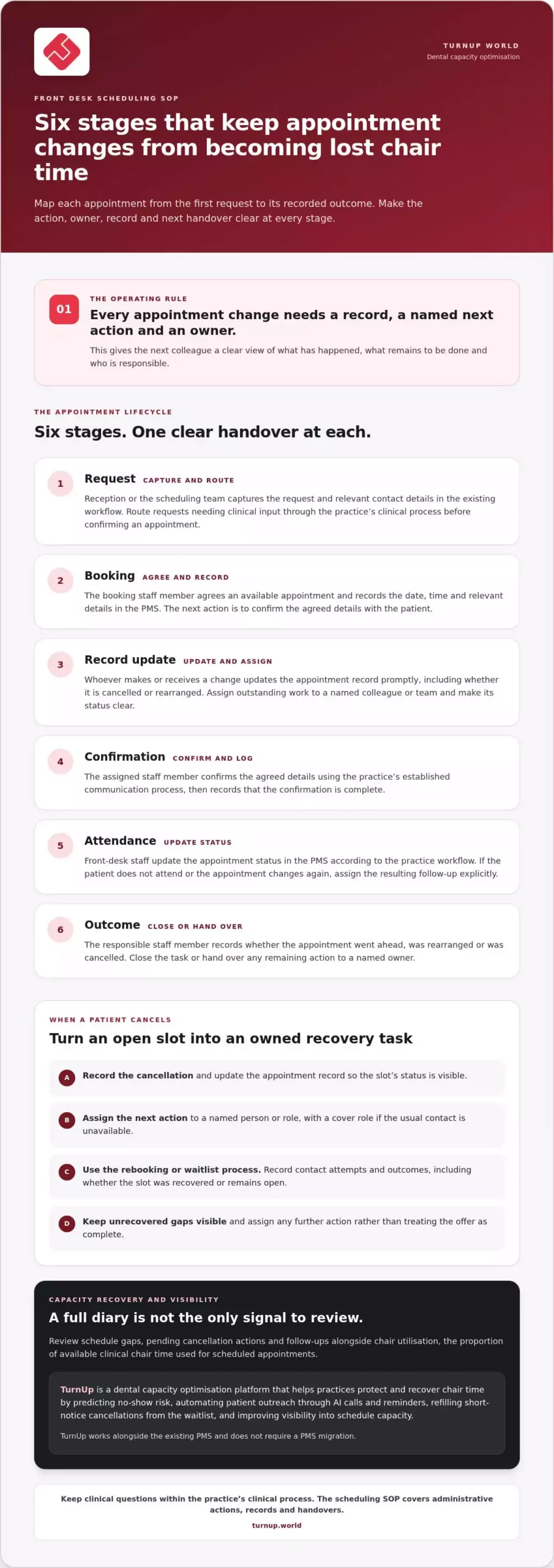
Map the process from the first request to the recorded outcome. At every stage, make the action, owner, record and next handover explicit. A useful test is whether a colleague taking over can tell what has happened, what remains to be done and who is responsible, without having to reconstruct the conversation.
- Request: The receptionist or scheduling team captures the patient’s request and relevant contact details in the practice’s existing workflow. If the request needs clinical input, route it through the practice’s clinical process before confirming an appointment.
- Booking: The booking staff member agrees an available appointment and records its date, time and relevant booking details in the PMS. The next action is to confirm the agreed details with the patient.
- Record update: The person who makes or receives a change updates the appointment record promptly, including whether the appointment is cancelled or rearranged. Any outstanding action is assigned to a named colleague or team, with a clear status.
- Confirmation: The assigned staff member confirms the agreed details using the practice’s established communication process and records completion. For examples of consistent rebooking conversations, use the practice’s approved dental reception phone scripts.
- Attendance: Front-desk staff update the appointment status in the PMS according to the practice workflow. If the patient does not attend or the appointment changes again, assign the resulting follow-up rather than leaving it implicit.
- Outcome: The responsible staff member records whether the appointment went ahead, was rearranged or was cancelled, then closes or hands over any remaining action.
Route cancellations into recovery
The person receiving a cancellation records it and alerts the colleague responsible for the next administrative action. That owner follows the rebooking or waitlist process, matching the newly available time with suitable patients. Record contact attempts and outcomes so the team can see whether the slot was recovered or remains open. If no suitable patient accepts, keep the gap visible and assign any further action rather than treating the offer as complete.
Automation can support this workflow by managing patient outreach and waitlist activity. TurnUp works alongside the existing PMS, with no PMS migration required, and helps practices recover short-notice cancellations. Its capacity optimisation platform brings together no-show prevention and cancellation recovery rather than treating reminders as the whole solution. Explore TurnUp’s dental capacity optimisation platform. Keep clinical questions outside the administrative pathway and direct them to the practice’s own clinical process.
Make the SOP usable when schedules change
A dental front desk scheduling SOP needs a clear exception route, not a separate procedure for every unusual day. Staff should know which administrative changes they can make, what must be recorded and when a manager takes ownership. Keep the steps consistent while allowing staff to respond appropriately to a patient’s circumstances.
Handle late changes without losing ownership
After a cancellation, the staff member who receives it updates the appointment record and assigns the next action to a named person or role. That owner follows the practice’s rebooking or waitlist process and records the outcome. If the usual contact is unavailable, the SOP should name a cover role. At handover, unresolved actions need a visible status, owner and next step so they do not disappear between shifts. Broader task coordination can sit alongside a guide to time blocking for dental reception staff.
Use a simple exception sequence:
- Record the change and any action already taken.
- Assign follow-up to an available, authorised team member.
- Escalate to the practice manager if authority, staffing or ownership is unclear.
- Route clinical questions through the practice’s own clinical process.
Keep the procedure workable across roles and sites
Define responsibilities by role rather than by an individual’s name. For example, reception staff can record routine changes, the designated scheduling role can manage rebooking follow-up, and the practice manager can resolve exceptions outside the team’s agreed authority. Adapt these roles to the practice’s structure and make cover arrangements clear.
For a DSO, set shared core steps for recording, assigning and closing appointment changes. Document any practice-level variation separately, such as who covers the scheduling queue, and state which local instruction applies. This gives teams a common operating framework without forcing identical handling of every patient situation.
TurnUp helps dental teams manage capacity through no-show risk prediction, patient outreach and cancellation recovery. See how TurnUp can support schedule capacity management.
Review the dental scheduling SOP and strengthen capacity recovery
A dental front desk scheduling SOP should improve as the team identifies where work stalls. Keep reviews focused on open schedule gaps, cancellations still awaiting action and follow-ups completed. These signals show whether staff can see available capacity, assign next steps and close the loop. Rather than setting arbitrary targets, look for recurring patterns, such as cancellations that remain unresolved, and adjust the step where the process breaks down.
Use operational signals to refine the workflow
Assign a practice manager or scheduling lead to review these signals with the team. Chair utilisation and cancellation recovery add useful context: they show how available clinical time is being used and whether released appointments are being refilled. Consider them together rather than treating either as a standalone score. A wider dental capacity management guide can help place these measures in the context of practice operations.
Invite staff to flag instructions or handovers that are unclear in practice. The reviewer should assess suggestions, approve relevant changes and update the controlled SOP so everyone uses the current version. Record what changed and communicate it to affected roles. This makes feedback actionable without allowing informal workarounds to become competing procedures.
Support the SOP with connected capacity workflows
Manual processes establish ownership, but repeated outreach and waitlist follow-up can be difficult to manage consistently across a busy schedule. TurnUp supports capacity optimisation through no-show risk prediction, automated patient outreach, short-notice cancellation recovery from the waitlist and visibility into schedule capacity. AI calls and reminders can support patient confirmation, cancellation and rebooking workflows. The platform is designed to help protect and recover chair time, not simply send appointment reminders.
Use the SOP to define how these workflows fit the team’s responsibilities, including who acts on an available slot and how outcomes are reviewed. Capacity insights and chair utilisation reporting help managers see where scheduling activity needs attention and guide the next process improvement. For multi-site groups, shared visibility into capacity and cancellation recovery can support consistent operational reviews across practices.
To strengthen the process, explore how TurnUp can help protect and recover chair time.
Turn your scheduling process into a stronger operating standard
The value of a dental front desk scheduling SOP comes from how reliably the team can use and improve it. Choose one point of friction to address first, such as a handover that regularly needs clarification. Assign an owner to update the process, brief the relevant team members and review whether the revised step works in practice.
Keep improvement controlled but practical. Staff should know where to find the current procedure and how to flag a confusing step. That creates a clear route from day-to-day experience to a better-defined workflow without allowing informal workarounds to take hold.
For practices ready to strengthen appointment capacity management, explore TurnUp’s dental capacity optimisation platform. A well-owned process gives your team a foundation for protecting chair time and making each scheduling action count.
Frequently Asked Questions
What should a dental front desk scheduling SOP include?
A dental front desk scheduling SOP should cover the appointment lifecycle, role ownership, records, confirmations, cancellations, rebooking follow-up and escalation boundaries. Make it practical at the desk with a short guide for each task: where to record the update, which status to use and what the next owner needs to know. Use the template as a starting point, then adapt it to your practice’s systems and team structure.
How often should a dental practice review its scheduling SOP?
Review the SOP when workflows, responsibilities or supporting systems change, and when recurring gaps appear. A useful test is to trace a recent appointment change from the first contact to its final outcome, then compare each action with the written procedure. Ask staff where the steps were unclear, assign an owner to assess proposed changes and record a review point in the document so updates do not depend on memory.
Can a dental scheduling SOP work with an existing PMS?
Yes. An SOP can document how staff use the practice’s current scheduling workflow. Specify which system holds the authoritative appointment record, where staff record changes and how they confirm updates are complete. For example, if a cancellation is noted during a call, the procedure should direct staff to update the agreed record before starting follow-up. TurnUp works alongside the existing PMS and does not require a PMS migration.
How should reception staff handle a short-notice cancellation?
Reception staff should record the cancellation promptly and follow the practice’s agreed rebooking or waitlist process. Make the open slot visible to the person responsible for recovery, and track offers and outcomes so colleagues do not contact the same patient twice or assume the chair has been refilled. Automated waitlist management can support short-notice cancellation recovery, while the practice’s procedure keeps responsibility and handovers clear.